Free · Open source · Local-only

The notebook for people who write code.

Text, code, markdown and images in one note, with real highlighting for 58 languages. Run Python like Jupyter, plus Bash, Node.js and Dart, all in a sandbox. Everything stays on your device.

latest release · Android · Windows · Linux · macOS
CodeNote
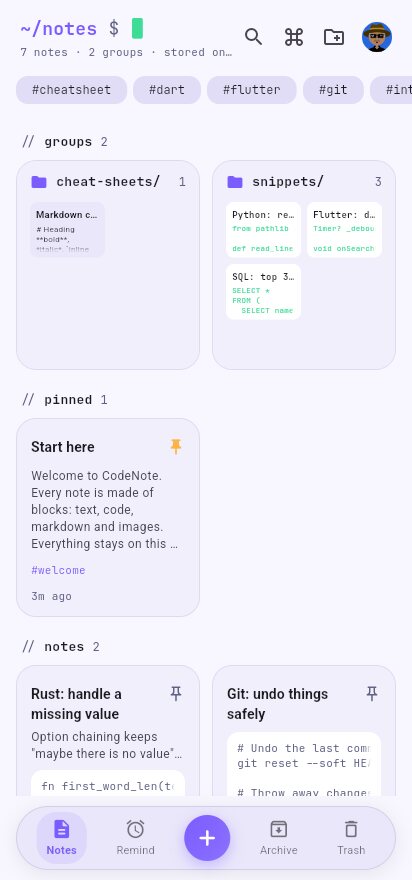
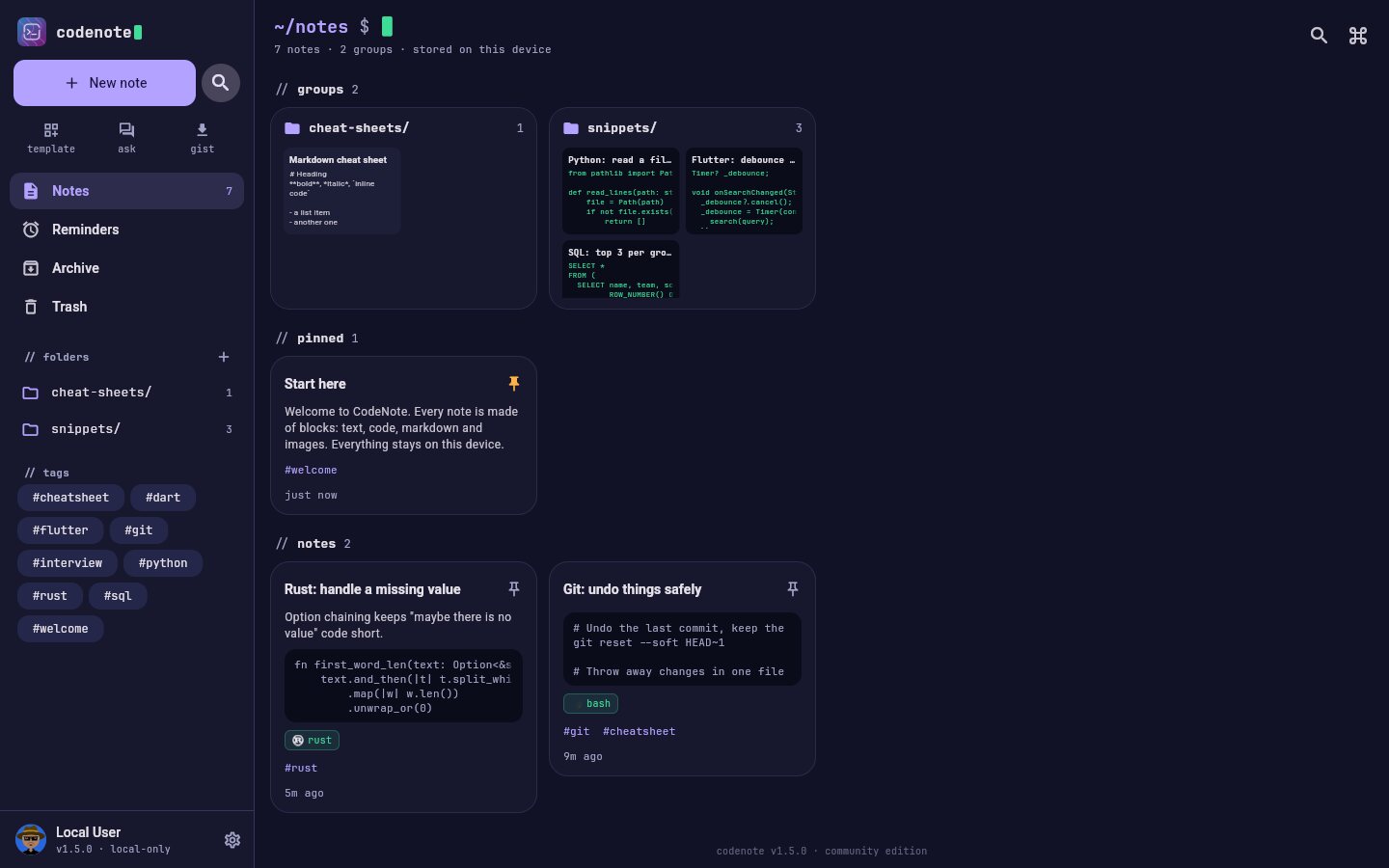
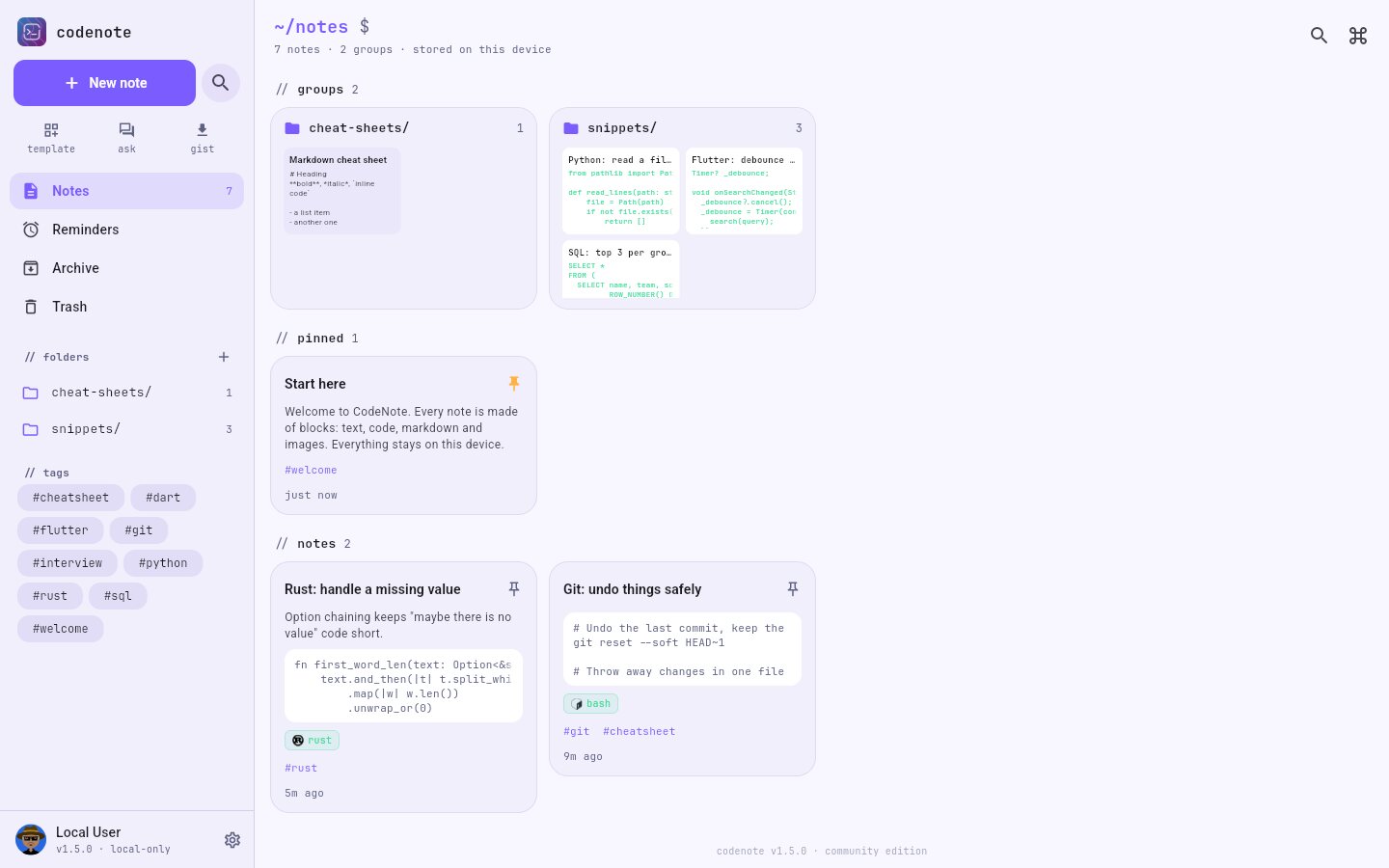
CodeNote home screen with folders, pinned notes and code cards CodeNote home screen in the light theme
// how it works

Write it once. Find it in a second.

01 · write

Mix blocks in one note

Text, code, markdown and images, in any order. Drag the handle to move a block.

02 · organize

Folders that show what's inside

Folders preview their notes, code and images, so you know what's in them before you open them. Tags and pins do the rest.

03 · find

Search, Ctrl+K, or just ask

Search titles, tags, text and code. Or ask a question and let the AI answer from your notes.

No account

Open the app and start writing. Nothing to sign up for.

Stored on your device

Notes live in a small database on your phone or computer, not on a server.

One-file backups

Every note, folder and image in one .codenote file. Restoring never deletes anything.

Open source

All the code is on GitHub under AGPL-3.0. Read it, build it, improve it.

// features

Everything a code note needs.

Built by a developer, for the snippets, commands and fixes you never want to search for twice.

Code that looks like code

Every code block gets real syntax highlighting, line numbers and the JetBrains Mono font. Pick a language by name or by file extension.

  • 58 languages, each with its logo
  • A symbol bar on phones for {} () => and indents
  • Copy, share as a file, or share as a pretty image
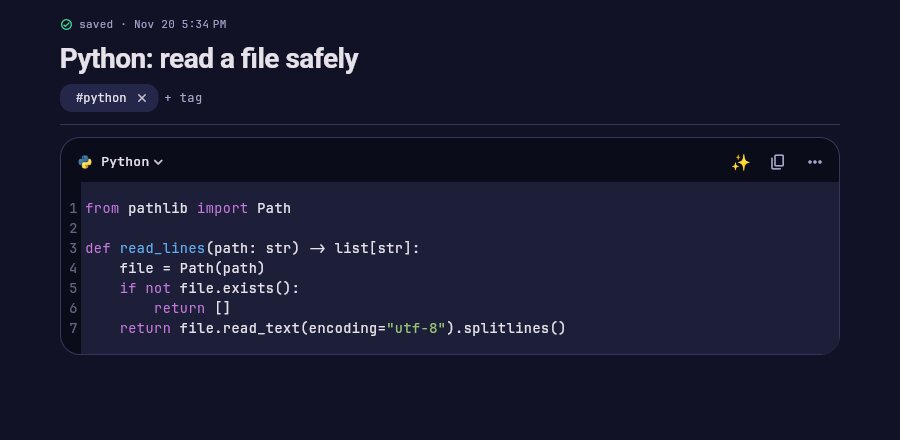
Python: read a file safely
A note with a highlighted Python code block
new in 1.5

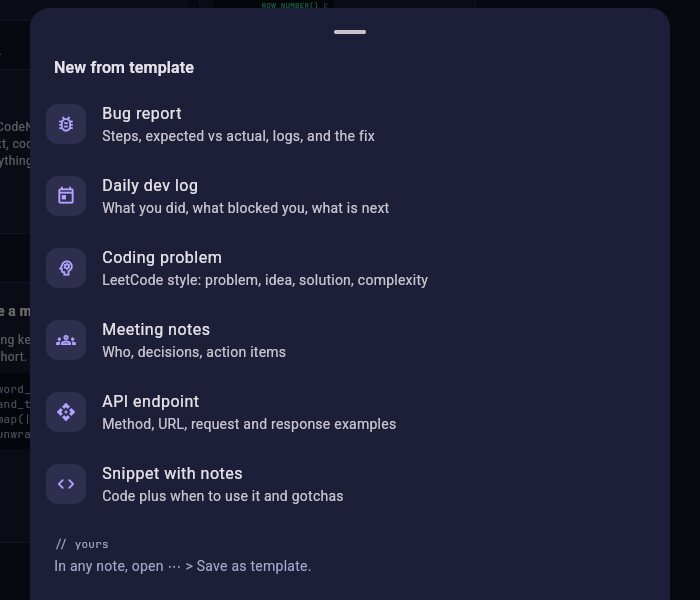
Start from a template

Never start from an empty page. Pick a template and fill in the blanks. Today's date is already there.

  • Bug report, dev log, LeetCode, meeting notes, API endpoint, snippet
  • Save any note as your own template
New from template
The template picker

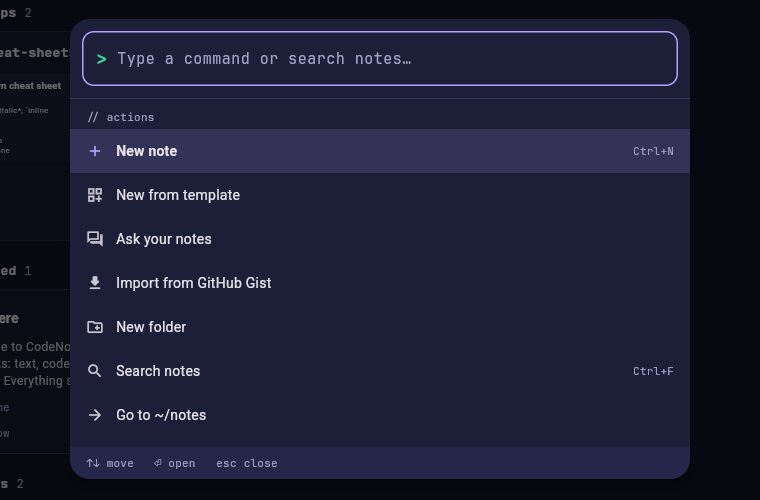
Everything from the keyboard

Press Ctrl K to find any note or run any action without touching the mouse.

  • Ctrl+N new note, Ctrl+F search, Esc to close
  • Jump to folders, templates, Ask and Gist import
  • On desktop, opening CodeNote twice focuses the window you already have
Ctrl+K
The command palette

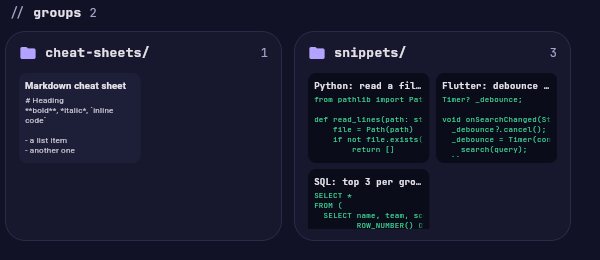
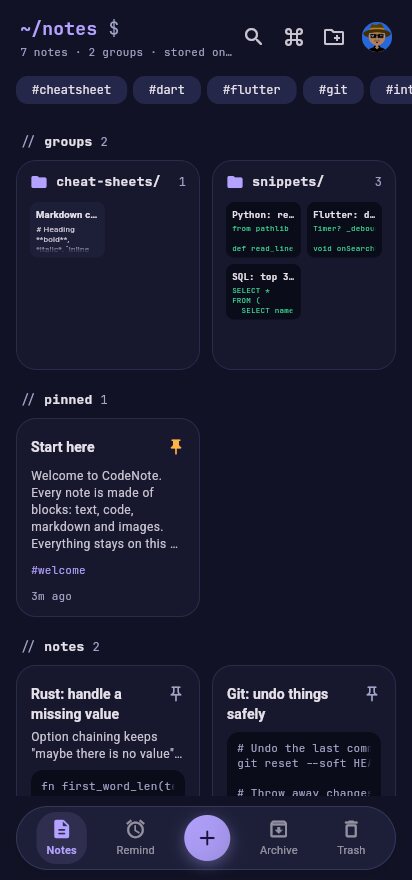
Folders that show what's inside

Each folder card shows small previews of its notes: the code, the text and the images. You can see where something is before you open anything.

  • Drag a note onto a folder to move it
  • Pin what matters, archive what doesn't
  • Trash keeps notes for 30 days, and every swipe has Undo
~/notes
Folder cards with previews of their notes

▶Web preview

Notes with HTML, CSS and JS get a play button that shows the page live.

⏰Real reminders

Reminders pop up as system notifications, even when the app is closed.

⇅GitHub Gist

Paste a gist link to turn it into a note, or upload a note as a gist.

▣Code as an image

Share a code block as a clean picture for X, LinkedIn or Discord.

⤓Share into CodeNote

Share a .py or .sql file from any app and it becomes a code block.

⟳Daily backup

On desktop, save a backup every day to Dropbox, Drive, Syncthing or a Git repo.

⌕Scan text

Turn a photo of code or text into a block (Android and iOS).

◐Light and dark

Follows your system, or pick one. Adjustable text size.

// run code

Run it right in the note.

Python, Bash, Node.js, TypeScript and Dart run inside your notes, in a sandbox that keeps them away from the rest of your files. Python, Node.js and Dart run on Windows, Linux and macOS; Bash runs on Android too.

Python that works like Jupyter

The Python blocks of a note share one kernel, so a df made in one block is there in the next. Every block gets a ▶ button, and Run note runs them all in order.

  • Rich output from any library: pandas tables, matplotlib and seaborn plots, images, HTML, the same way Jupyter shows them
  • In [n] counters, Interrupt that keeps your variables, and Restart kernel
  • %pip install and !commands in any block, and input() works too
  • Save the output under the block: text, tables and plots become blocks of the note
  • Open Jupyter notebooks (.ipynb) as notes: cells become blocks, and saved outputs and plots come alongcoming in 1.9.0
  • Jupyter shortcuts: Shift Enter runs and moves on, Esc then A / B / D D / M like in Jupytercoming in 1.9.0
pandas cookbook

Everything runs in a sandbox

Each folder of notes gets its own sandbox folder. Scripts start there, and their home, temp and cache folders all point there. Anything they download stays there until you choose Save a copy.

  • Android and macOS: the system keeps CodeNote in its own space
  • Linux: bubblewrap hides your home folder and drives from scripts
  • Windows: scripts get their own folder, and running code needs your OK first
  • On Windows and Linux, runtimes download from their official sources into the sandbox, never into your system (macOS uses the ones you have). Update packages, or clear everything, from Settings
  • Expose sandbox, off by default: when you trust the code, let it reach your own files (Linux, Windows)coming in 1.9.0
Settings · Runtimes and sandbox

⇄Backend + frontend

Notes in one folder share a sandbox. Run a FastAPI server in one note and the web page in another can call it.

↧Run a whole folder

Set the order, skip steps, and mark the main block that runs last and keeps running. Runs keep going when you leave the note.

▦Mini apps

An HTML note is a small app that can save its data. Try the Snake game in the demos.

◎Demos to start from

A YouTube downloader with every option, a FastAPI backend, a pandas cookbook and a PyTorch model.

≡Live progress

Package downloads show a progress bar, and a ring on ▶ shows what's still running.

⧉Share as .codenote

Send a note or a whole folder as one file: blocks, images, run order and saved app data.

$Bash everywhere

Bash and shell blocks run on Linux, macOS and Android. On Windows CodeNote downloads BusyBox for you.

◫Open .ipynb

Open a notebook from Jupyter, Colab or Kaggle and it becomes a note you can run. coming in 1.9.0

↵Double-click to open

Double-click a .codenote file and it opens in CodeNote, even when CodeNote is already open. coming in 1.9.0

⌗Sandbox folder

Open the sandbox in your file manager from Settings, to see what your scripts made. coming in 1.9.0

>_Terminal

A shell that starts in the note's sandbox folder, one tap away from any run.

◇Dart and TypeScript

The Dart SDK and TypeScript run straight from a block. On Windows and Linux CodeNote downloads them once.

// ai, your way

An assistant that knows your notes.

Off until you turn it on. Use Claude, any OpenAI-compatible API, or a model on your own computer, so nothing leaves it.

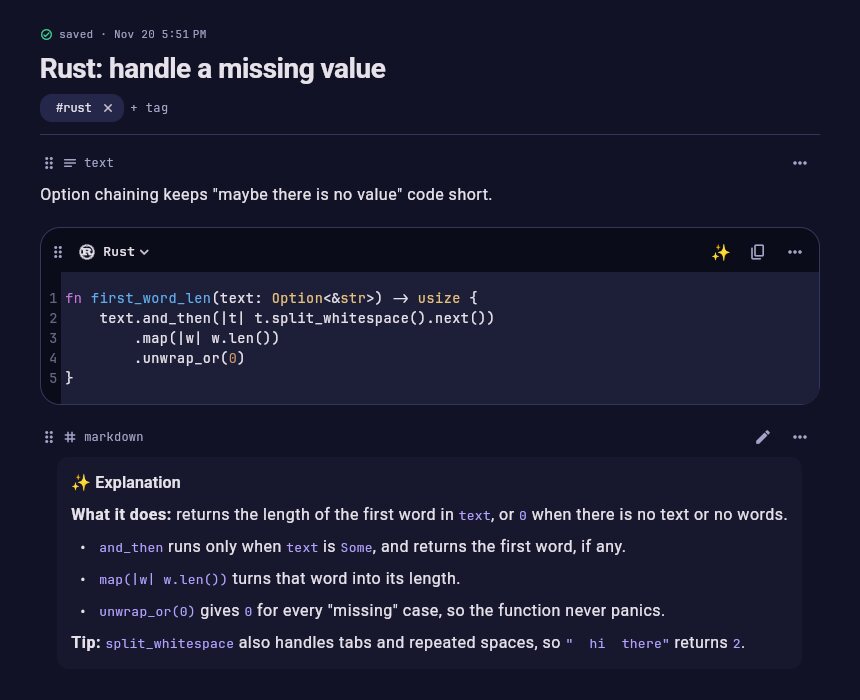
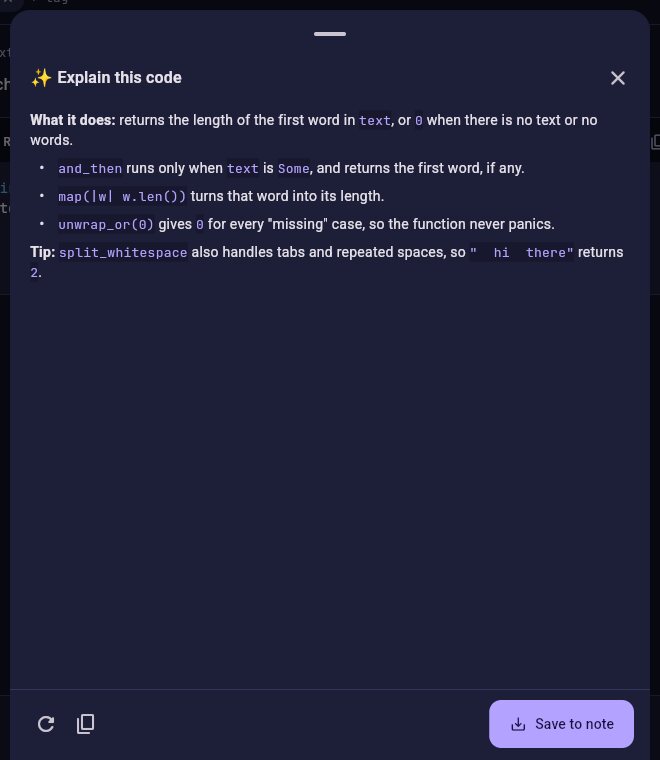
✨ Explain, find bugs, improve

Tap ✨ on any code block. Read the answer, then save it into the note, right under the code, so you never ask twice.

  • Only the code block you ask about is sent
  • Answers in clean markdown with code examples
Rust: handle a missing value
An AI explanation saved under a Rust code block
✨ Explain this code
The Explain this code panel
new in 1.5

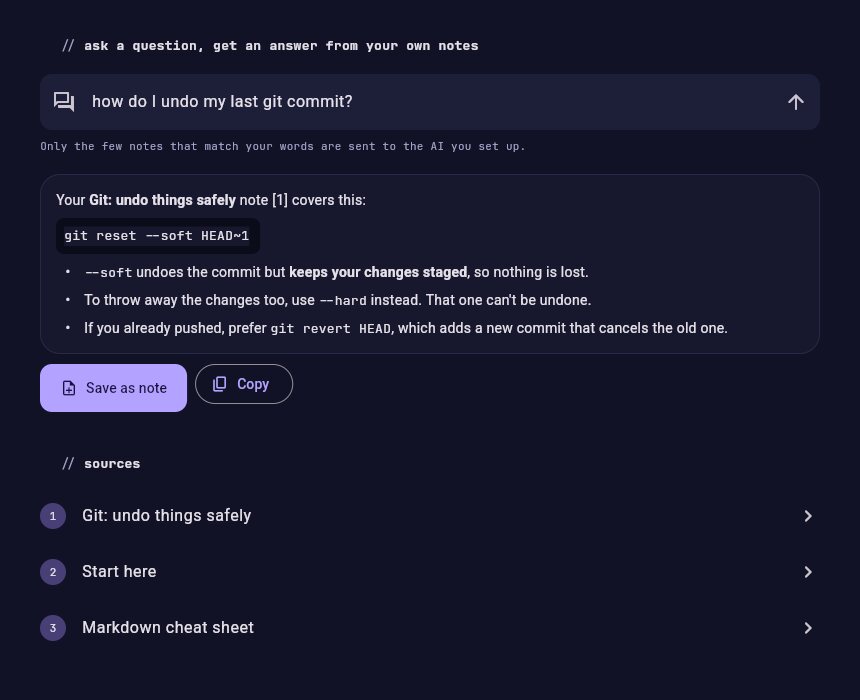
Ask your notes

Ask a question in plain words. CodeNote finds the notes that match and the AI answers from them, with links to each note it used.

  • Save the answer as a new note
  • Only the few matching notes are sent, never your whole notebook
Ask your notes
Ask your notes, with an answer and its source notes

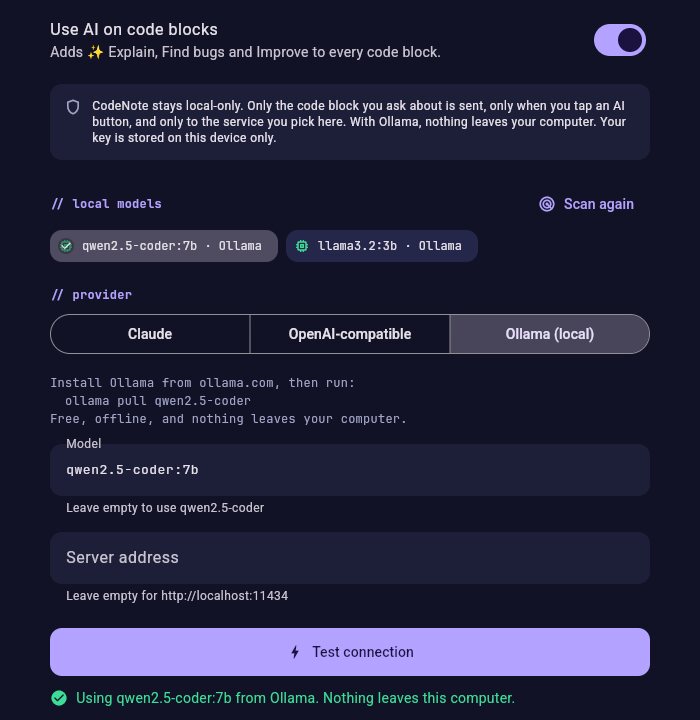
Finds your local models

Already run Ollama or LM Studio? CodeNote spots your installed models the moment you open the AI settings. One tap and you're set: no key, no internet, nothing leaves your computer.

AI assistant
AI settings listing local models found automatically
~/

Your notes never leave your device.

No account, no cloud, no analytics in the app. The AI is optional, and you choose exactly where its requests go. Backups are a single file that you keep.

// 58 languages

Your stack is in here.

From Python to Solidity, every language gets proper highlighting. Type a name or an extension to check yours.

Arduino.ino
ARM Assembly.s
Bash.sh
C.c
C#.cs
C++.cpp
Clojure.clj
CMake.cmake
CSS.css
Dart.dart
Django.py
Dockerfile.Dockerfile
Elixir.ex
Erlang.erl
F#.fs
Fortran.f90
Go.go
Gradle.gradle
GraphQL.graphql
Groovy.groovy
Haskell.hs
HTML.html
Java.java
JavaScript.js
JSON.json
Julia.jl
Kotlin.kt
Less.less
Lua.lua
<>Makefile.mk
Markdown.md
MATLAB.m
Nginx config.conf
Objective-C.mm
OCaml.ml
Perl.pl
PHP.php
PostgreSQL.sql
PowerShell.ps1
Protocol Buffers.proto
Python.py
R.r
Ruby.rb
Rust.rs
Scala.scala
SCSS.scss
Solidity.sol
SQL.sql
Swift.swift
TOML / INI.toml
TypeScript.ts
VB.NET.vb
Verilog.v
<>VHDL.vhd
x86 Assembly.asm
XML.xml
YAML.yaml
AaPlain text.txt
// android

On your phone too.

The same notes, the same speed, made for your thumb.

  • Share into CodeNote from any app: links, text, photos, code files
  • Scan code from a screenshot or a whiteboard
  • Swipe to archive or delete, with Undo
  • Updates install over the old version and keep your notes
  • Move notes between phone and computer with a backup file
CodeNote on a phone, dark theme
CodeNote on a phone, light theme
// shortcuts

Hands stay on the keyboard.

Command paletteCtrl K
New noteCtrl N
SearchCtrl F
CloseEsc
Run, move oncoming in 1.9.0Shift Enter
Run blockcoming in 1.9.0Ctrl Enter
Block modecoming in 1.9.0Esc
Stop · restartcoming in 1.9.0II · 00
// download

Download CodeNote.

Always the newest version, straight from GitHub. Free forever.

for you
// windows 10, 11

Windows

Unzip, then run code_note.exe. No installer needed.

for you
// macos

Mac

Unzip and move CodeNote to Applications.

for you
// ubuntu, debian, mint, zorin

Linux

Install the .deb, then open CodeNote from the app menu or run codenote. The .tar.gz works on any Linux.

for you
// android 7.0 and newer

Android

One APK for every phone. New versions install over the old one and keep your notes.

First time opening it?
Windows

SmartScreen may say "Windows protected your PC". Click More info, then Run anyway. This happens because the app isn't code-signed yet.

Mac

The app isn't notarized yet, so the first time, right-click CodeNote and choose Open, then Open again.

Linux

In a terminal: sudo apt install ./CodeNote-*-linux-amd64.deb. For the .tar.gz, extract it and run ./code_note.

All versions and what's new → · Changelog

~/notes $ echo "happy coding"

Made for developers who keep their best fixes in notes.