inPace

The inPace guide.دليل inPace.

Everything inPace does, in the order you'll use it. Tempo also gives you a short tour inside the app the first time you open it, and you can replay it from Settings.كل ما يفعله inPace، بالترتيب الذي ستستخدمه به. ويأخذك Tempo أيضًا في جولة قصيرة داخل التطبيق أول مرة تفتحه، ويمكنك إعادتها من الإعدادات.

01

Get startedابدأ

  • Download inPace for Windows, Mac or Linux from the download section and open it. It opens in its own window.حمّل inPace لويندوز أو ماك أو لينكس من قسم التحميل وافتحه. يفتح في نافذته الخاصة.
  • Type your name and make your turtle. Pick a shell, a scarf, a skin and something to wear. Your turtle is your picture everywhere in inPace and travels on your contact card. Change it or save a picture of it from Settings → Your turtle. inPace also makes a private key for you on your computer. It's how your milestones prove they're yours. No account, no email.اكتب اسمك واصنع سلحفاتك. اختر صدفة ووشاحًا ولون جلد وشيئًا ترتديه. سلحفاتك هي صورتك في كل مكان في inPace، وتنتقل مع بطاقة التواصل. غيّرها أو احفظ صورة لها من الإعدادات ← سلحفاتك. ويصنع inPace أيضًا مفتاحًا خاصًا لك على جهازك، وبه تثبت محطاتك أنها لك. بدون حساب أو بريد.
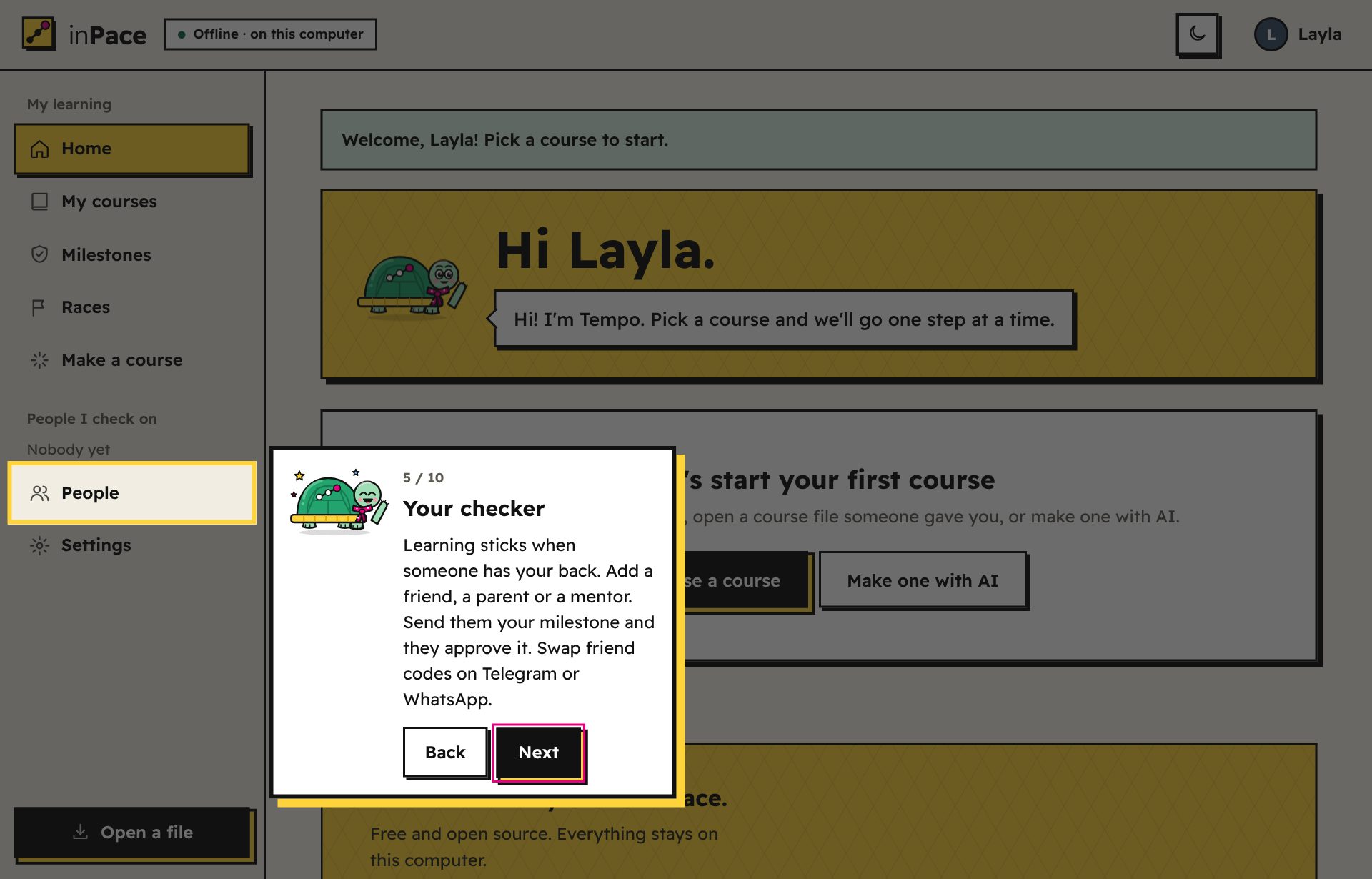
  • Meet Tempo. The turtle walks you through the app in about a minute. Replay it any time from Settings → Show the tour again.تعرّف على Tempo. السلحفاة تأخذك في جولة في التطبيق خلال دقيقة تقريبًا. أعدها متى شئت من الإعدادات ← اعرض الجولة مرة أخرى.
  • Updates: the app asks once if it may keep itself up to date. Say yes and new versions install by themselves.التحديثات: يسألك التطبيق مرة واحدة إن كان يمكنه تحديث نفسه. وافق وستُثبَّت الإصدارات الجديدة تلقائيًا.
Tempo the turtle explaining the Make a course button during the welcome tour.
02

Add a courseأضف دورة

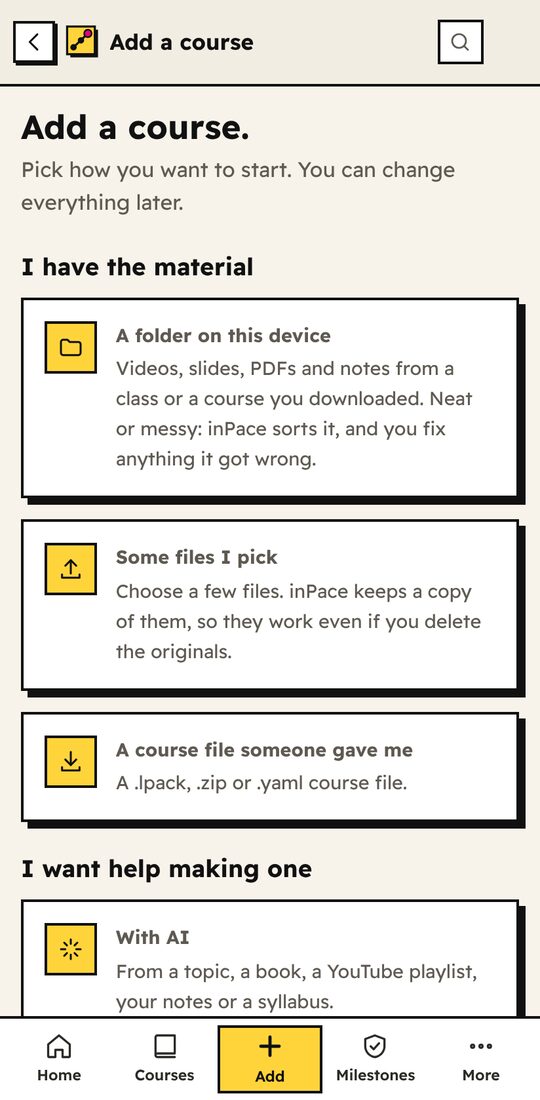
Press Add a course (or Add in the tab bar on a phone). There are several ways in:اضغط أضف دورة (أو إضافة في شريط الأسفل على الهاتف). هناك عدة طرق:

  • The course library: open Course library in the sidebar and press Add, or tap a course link a friend sent you. You can also browse it on the web.مكتبة الدورات: افتح مكتبة الدورات من الشريط الجانبي واضغط أضف، أو اضغط رابط دورة أرسله صديق. ويمكنك أيضًا تصفّحها على الويب.
  • A sample course: Python Basics (English or Arabic), or the full FastAPI course, 12 modules from your first API to production.دورة جاهزة: أساسيات بايثون (بالعربية أو الإنجليزية)، أو دورة FastAPI الكاملة، 12 وحدة من أول واجهة برمجية حتى النشر.
  • The tour: "A tour of inPace" is a short sample course with one of everything: video, audio, pictures, code, an interactive page, part of a book, slides, a Word file, a spreadsheet, tasks and a quiz. Start here to see what a course can hold.الجولة: «جولة في inPace» دورة نموذجية قصيرة فيها من كل شيء: فيديو وصوت وصور وكود وصفحة تفاعلية وجزء من كتاب وشرائح وملف Word وجدول ومهام واختبار. ابدأ بها لترى ما يمكن أن تحمله الدورة.
  • A book (PDF): pick the book and inPace reads its chapters and sections from the bookmarks. Each chapter becomes a part of the course and each section a lesson that opens only its own pages. Long chapters are split into shorter lessons. No bookmarks? It splits the book every 12 pages, and you rename the parts. The cover and contents start in Left out.كتاب (PDF): اختر الكتاب فيقرأ inPace فصوله وأقسامه من العلامات. كل فصل يصبح جزءًا من الدورة وكل قسم درسًا يفتح صفحاته فقط. والفصول الطويلة تُقسَّم إلى دروس أقصر. لا توجد علامات؟ يقسّم الكتاب كل 12 صفحة، وتغيّر أنت أسماء الأجزاء. الغلاف والفهرس يبدآن في المستبعَد.
  • A course file someone shared (.lpack, .zip or .yaml). Use Open a file.ملف دورة شاركه أحد معك (.lpack أو .zip أو .yaml). استخدم افتح ملفًا.
  • A folder of class material, neat or messy. inPace sorts it by sub-folders, by the week or lecture numbers in the file names, or by kind. Modern Word, PowerPoint and Excel files come in too. Then you fix it: rename, drag files between sections, leave files out, or ask AI to sort it. Last, choose to leave the files where they are (no extra space, even for 60 GB) or copy them into inPace.مجلد مادة دراسية، مرتب أو غير مرتب. يرتبه inPace حسب المجلدات الفرعية، أو أرقام الأسابيع والمحاضرات في أسماء الملفات، أو حسب النوع. ملفات Word وPowerPoint وExcel الحديثة تدخل الدورة أيضًا. ثم تصححه: غيّر الأسماء، اسحب الملفات بين الأقسام، استبعد ملفات، أو اطلب من الذكاء الاصطناعي ترتيبها. أخيرًا اختر ترك الملفات في مكانها (بلا مساحة إضافية حتى لـ 60 جيجابايت) أو نسخها إلى inPace.
  • Some files you pick, handy on a phone. inPace keeps a copy, and you sort them the same way.ملفات تختارها، مفيدة على الهاتف. يحتفظ inPace بنسخة منها، وترتبها بالطريقة نفسها.
  • A list of YouTube links, one per line. Each link becomes a lesson, and a line starting with # starts a new module.قائمة روابط يوتيوب، رابط في كل سطر. كل رابط يصبح درسًا، والسطر الذي يبدأ بـ # يبدأ وحدة جديدة.
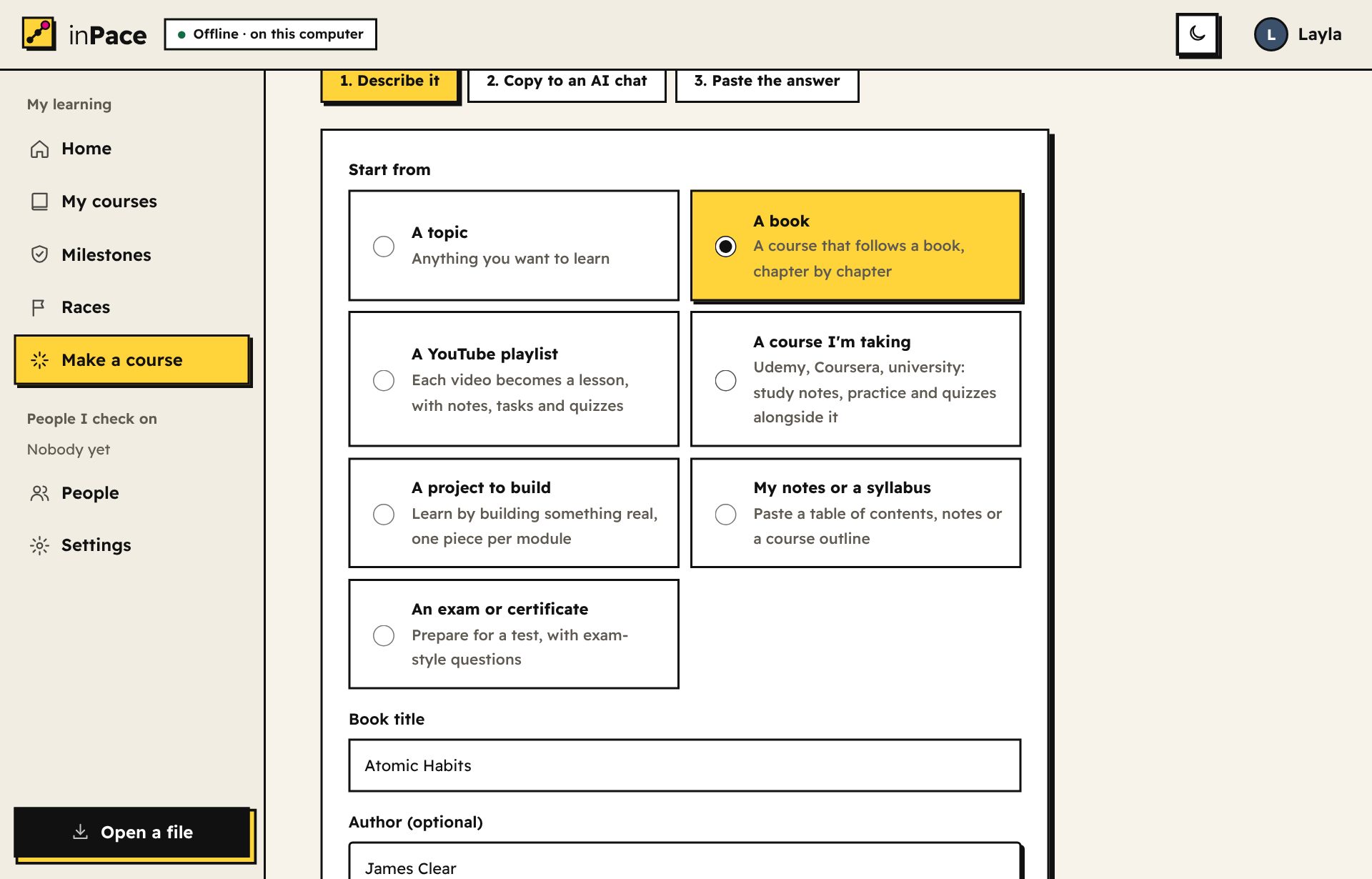
  • With AI, from a topic, a book, a YouTube playlist, a course you're taking, a project, your own notes, or an exam. inPace writes the prompt, you paste it into any AI chat, then paste the answer back. Building around a book or your own files? Attach them in Attach your book or files: they become part of the course, and the prompt tells the AI their pages and chapters so each lesson opens the right part.بالذكاء الاصطناعي، من موضوع أو كتاب أو قائمة تشغيل يوتيوب أو دورة تدرسها أو مشروع أو ملاحظاتك أو امتحان. يكتب inPace الطلب، فتلصقه في أي محادثة ذكاء اصطناعي، ثم تلصق الرد. تبني الدورة حول كتاب أو ملفاتك؟ أرفقها في أرفق كتابك أو ملفاتك: تصبح جزءًا من الدورة، ويخبر الطلبُ الذكاءَ الاصطناعي بصفحاتها وفصولها ليفتح كل درس الجزء الصحيح.
The AI course maker with options: a topic, a book, a YouTube playlist, a course I'm taking, a project, my notes, an exam.
03

Roadmapsمسارات التعلّم New in 1.24جديد في 1.24

A roadmap is a path through several courses, in order, toward one goal: "Become a data analyst", "Maths for machine learning", "English from A1 to B1". It has no lessons of its own, only the courses and a note for each one. Roadmaps need inPace 1.24 or newer.مسار التعلّم طريق يمرّ بعدة دورات بالترتيب نحو هدف واحد: «كن محلّل بيانات»، «الرياضيات لتعلّم الآلة»، «الإنجليزي من A1 إلى B1». ليس فيه دروس خاصة به، بل الدورات وملاحظة لكل واحدة. وتحتاج المسارات inPace 1.24 أو أحدث.

  • Follow one. Open Roadmaps in the sidebar (under More on a phone), or Course library → Roadmaps, and press Follow. You add each course when you get to it, so nothing big downloads at once, or press Add all to get them all before you go offline. If a course on a roadmap someone sent you isn't in the library, the roadmap skips to the next one and lets you take it off.تابِع مسارًا. افتح مسارات التعلّم من الشريط الجانبي (أو من المزيد على الهاتف)، أو مكتبة الدورات ← المسارات، واضغط تابِع. وتضيف كل دورة عندما تصل إليها، فلا يُحمّل شيء كبير دفعة واحدة، أو اضغط أضف الكل لتحصل عليها كلها قبل أن تنقطع عن الإنترنت. وإن كانت في مسار أرسله لك أحد دورةٌ ليست في المكتبة، ينتقل المسار إلى الدورة التالية ويتيح لك حذفها.
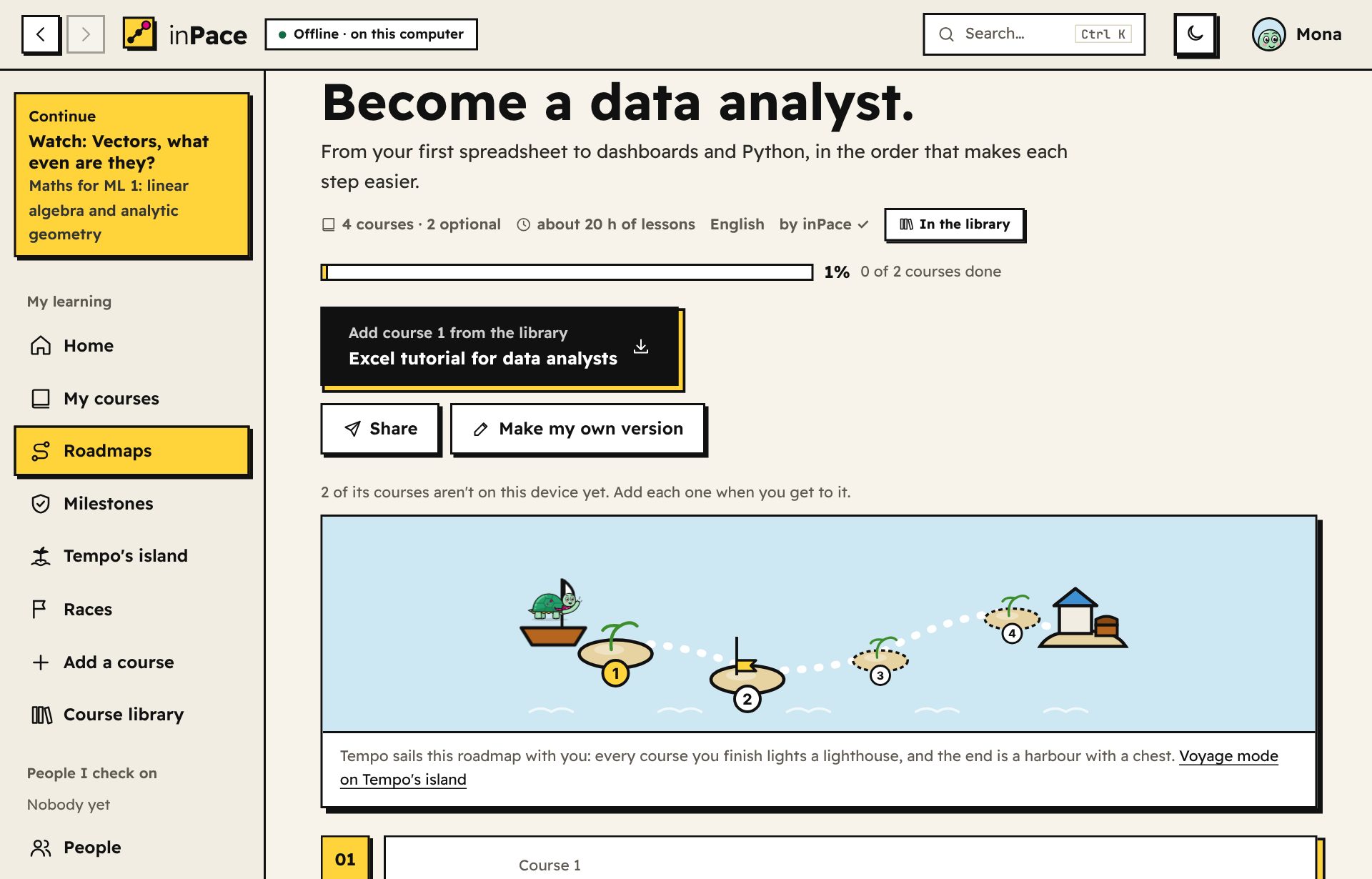
  • Always know what's next. The roadmap page shows every course in order with its note, what you finished, and one big button for the next step: add it, start it, or continue it. Home shows where you are, and each course says which roadmap it's on.اعرف دائمًا ما التالي. تعرض صفحة المسار كل الدورات بالترتيب مع ملاحظاتها وما أنهيته، وزرًا كبيرًا للخطوة التالية: أضفها أو ابدأها أو تابعها. والرئيسية تريك أين أنت، وكل دورة تقول في أي مسار هي.
  • Make your own. Press Make a roadmap and type a goal: inPace picks the matching courses from yours and the library's and puts them in order (the basics first, the parts of a series together). Move them up or down, add a note to each, mark some optional, and save.اصنع مسارك. اضغط اصنع مسارًا واكتب هدفًا: يختار inPace الدورات المناسبة من دوراتك ومن المكتبة ويرتّبها (الأساسيات أولًا، وأجزاء السلسلة معًا). حرّكها لأعلى أو لأسفل، وأضف ملاحظة لكل دورة، واجعل بعضها اختياريًا، ثم احفظ.
  • Share it. Share gives you a link to send: the whole roadmap fits inside it. Or publish it to the library with Share → Open the form: the roadmap is filled in for you, and a bot checks it. A library roadmap can only use courses that are in the library.شاركه. زر شارك يعطيك رابطًا ترسله، والمسار كله داخله. أو انشره في المكتبة من شارك ← افتح النموذج: يُملأ المسار لك ويفحصه روبوت. ولا يستخدم مسار المكتبة إلا دورات موجودة في المكتبة.
  • A voyage on Tempo's island. Every roadmap you follow is a sea route in Tempo's island → Voyages: each course is a port, a finished course lights its lighthouse (10 shells), and the harbour at the end holds a chest (100 shells). Your first port brings a new friend, Nawras the seagull.رحلة على جزيرة تمبو. كل مسار تتابعه طريق بحري في جزيرة تمبو ← الرحلات: كل دورة ميناء صغير، والدورة المكتملة تضيء منارتها (10 أصداف)، وفي الميناء الأخير صندوق كنز (100 صدفة). وأول ميناء يأتيك بصديق جديد، نورس الطائر.
A roadmap in inPace: Become a data analyst, its voyage chart with Tempo's boat, and the next course to add.
04

Learnتعلّم

  • Your course is a trail. Each lesson is a stone, and Tempo stands where you are. The next module opens when you finish the one before.دورتك طريق. كل درس حجر، ويقف Tempo حيث أنت. تُفتح الوحدة التالية عندما تنهي التي قبلها.
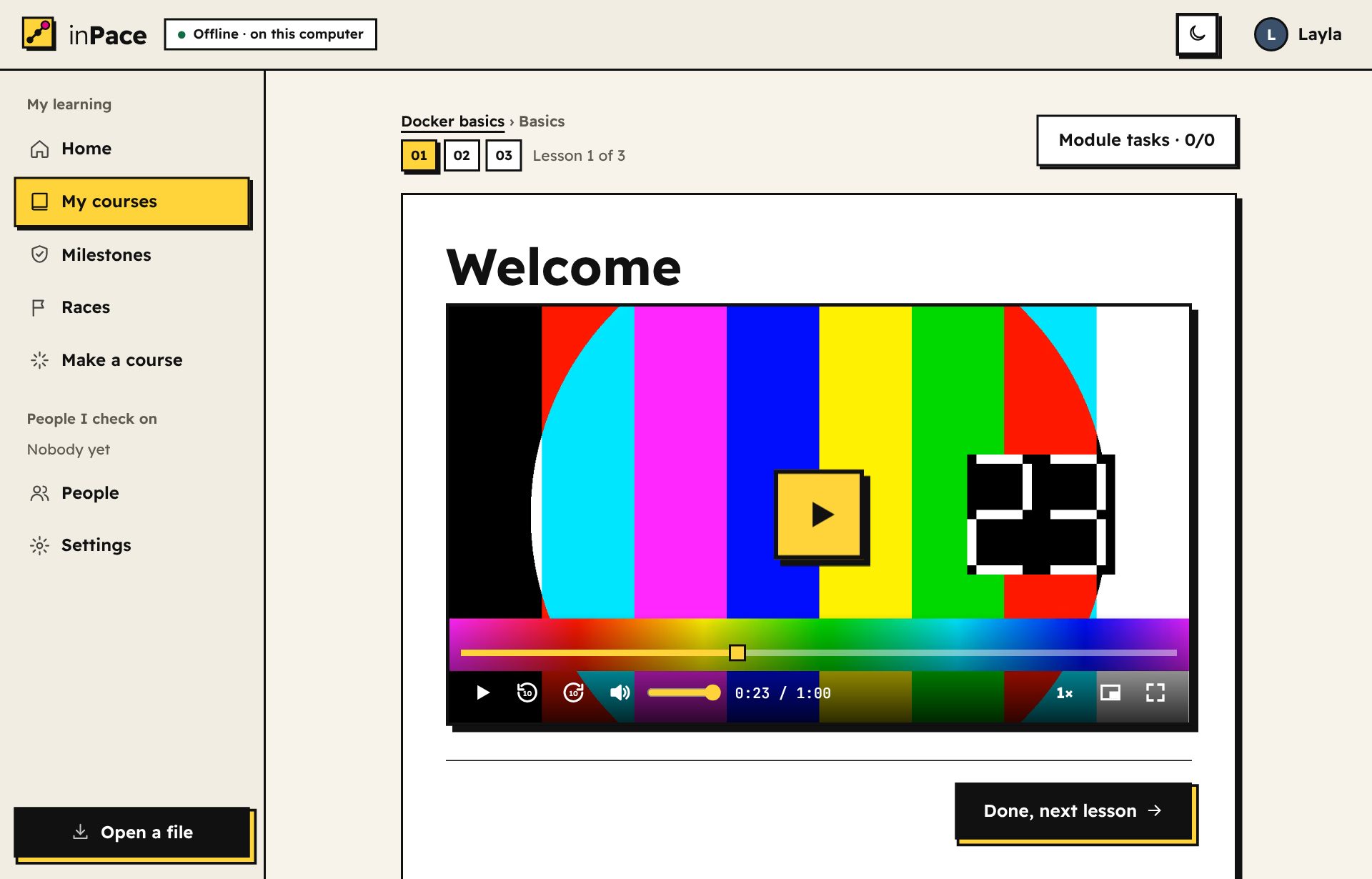
  • Videos remember where you stopped, to the second, even after you close the app. Speed, ±10 seconds, full screen and keyboard keys (Space, J, L, F, M) are all there.الفيديوهات تتذكر أين توقفت بالثانية، حتى بعد إغلاق التطبيق. والسرعة، والتقديم والرجوع 10 ثوانٍ، وملء الشاشة، ومفاتيح لوحة المفاتيح (Space وJ وL وF وM) كلها موجودة.
  • Watch YouTube lessons offline. A course with YouTube videos has a Watch offline box. Choose the quality (360p to 1080p, or Best available) and press Download the videos: they're saved in your Downloads folder, in inPace/<course name> (on Android, the phone's Download folder). The box shows how much space they need and warns you if there isn't enough. Already have the videos? Press I already have these videos, choose their folder, and inPace matches each file to its lesson even when the names are a bit different. Lessons then play the copy on your device, still only their own part, from where you stopped. Want just one? Press Download this video under any YouTube lesson: it downloads while you keep learning and shows how far along it is. Or press the small Download for offline button at the top of the course page to get them all.شاهد دروس يوتيوب بدون إنترنت. الدورة التي فيها فيديوهات يوتيوب فيها مربع شاهد بدون إنترنت. اختر الجودة (من 360p إلى 1080p أو أفضل جودة متاحة) واضغط حمّل الفيديوهات: تُحفظ في مجلد التنزيلات داخل inPace/اسم الدورة (وعلى أندرويد في مجلد Download بالهاتف). يعرض المربع المساحة المطلوبة وينبهك إن لم تكفِ. عندك الفيديوهات بالفعل؟ اضغط عندي هذه الفيديوهات بالفعل واختر مجلدها، ويطابق inPace كل ملف بدرسه حتى لو اختلفت الأسماء قليلًا. بعدها يعمل كل درس من النسخة الموجودة على جهازك، بجزئه فقط ومن حيث توقفت. تريد فيديو واحدًا فقط؟ اضغط حمّل هذا الفيديو تحت أي درس يوتيوب: يُحمّل وأنت تتابع التعلم ويعرض كم وصل. أو اضغط الزر الصغير حمّل للمشاهدة بدون إنترنت أعلى صفحة الدورة لتحمّلها كلها.
  • PDFs open inside the lesson in the built-in reader: page buttons, zoom (a list from fit to width and fit to page to 400%, Ctrl + mouse wheel, or two fingers on a phone), rotate, night mode for dark pages, and full screen. Zooming keeps your place on the page. It works offline and remembers your page and your zoom. Open the PDF on its own page gives it the whole window. A lesson made from a book shows only its own pages, like "Pages 5 to 7", and remembers your page in each part.ملفات PDF تفتح داخل الدرس في القارئ المدمج: أزرار الصفحات، والتكبير (قائمة من ملاءمة العرض وملاءمة الصفحة حتى 400%، أو Ctrl مع عجلة الفأرة، أو إصبعين على الهاتف)، والتدوير، والوضع الليلي لصفحات داكنة، وملء الشاشة. والتكبير يبقيك في مكانك من الصفحة. يعمل بدون إنترنت ويتذكر صفحتك ومستوى التكبير. وافتح الـ PDF في صفحة مستقلة يعطيه النافذة كلها. والدرس المأخوذ من كتاب يعرض صفحاته فقط، مثل «الصفحات 5 إلى 7»، ويتذكر صفحتك في كل جزء.
  • Courses that read a book you get yourself. Some courses (like Maths for Machine Learning) follow a free book that can't be shared, so it isn't inside the course. Download the book from the link on the course page, then press Find it for me: inPace looks in your Downloads, Documents and Desktop folders (on a phone: Download, Documents and Books) and recognizes the book by its title and number of pages, whatever the file is called. Or choose the folder or the file yourself. If your copy has a different number of pages, inPace warns you that it may be another edition.دورات تقرأ كتابًا تحصل عليه بنفسك. بعض الدورات (مثل الرياضيات لتعلّم الآلة) تتبع كتابًا مجانيًا لا يجوز مشاركته، لذلك لا يكون داخل الدورة. حمّل الكتاب من الرابط في صفحة الدورة، ثم اضغط ابحث عنه لي: يبحث inPace في مجلدات التنزيلات والمستندات وسطح المكتب (وعلى الهاتف: Download وDocuments وBooks) ويتعرّف على الكتاب من عنوانه وعدد صفحاته مهما كان اسم الملف. أو اختر المجلد أو الملف بنفسك. وإذا كان عدد صفحات نسختك مختلفًا، ينبّهك inPace أنها قد تكون طبعة أخرى.
  • Word, PowerPoint and Excel files show as a light preview inside the lesson: headings, lists, tables, slides in order and each sheet as a table. To edit one, press Download to open it in its own app. Old formats (.doc, .ppt, .xls) need saving as the new ones or as PDF first.ملفات Word وPowerPoint وExcel تظهر كمعاينة خفيفة داخل الدرس: العناوين والقوائم والجداول والشرائح بالترتيب وكل ورقة كجدول. لتعديل أحدها اضغط نزّله لتفتحه في تطبيقه. أما الصيغ القديمة (.doc و.ppt و.xls) فاحفظها أولًا بالصيغ الجديدة أو PDF.
  • Code files show with colours and a Copy button. A project folder becomes one lesson with all its files.ملفات الكود تظهر ملوّنة مع زر نسخ. ومجلد المشروع يصبح درسًا واحدًا فيه كل ملفاته.
  • Diagrams: write one as text in a code block marked mermaid and inPace draws it, even offline. Zoom in, drag it around, or open it full screen.الرسوم التوضيحية: اكتب الرسم كنص داخل كتلة كود عليها mermaid ويرسمه inPace، حتى بدون إنترنت. كبّره وحرّكه، أو افتحه بملء الشاشة.
  • Arabic and English together: each paragraph, list item and table cell goes the way its own words go, so mixed lessons read right. Code stays left to right.العربية والإنجليزية معًا: كل فقرة وبند وخانة جدول تتجه حسب كلماتها، فتُقرأ الدروس المختلطة صحيحة. ويبقى الكود من اليسار لليمين.
  • Each module ends with tasks: upload your work or record a voice note, explain an idea in your own words, or take a quiz whose choices change every time.كل وحدة تنتهي بمهام: ارفع عملك أو سجّل رسالة صوتية، أو اشرح فكرة بكلماتك، أو أدِّ اختبارًا تتغير خياراته كل مرة.
  • Optional tasks are marked Optional and listed last. They're good practice, but the next module opens without them. In the Maths for ML courses, the quiz is what finishes a module.المهام الاختيارية مكتوب عليها اختياري وتأتي في الآخر. هي تمرين مفيد، لكن الوحدة التالية تُفتح بدونها. في دورات الرياضيات لتعلّم الآلة، الاختبار هو ما يُنهي الوحدة.
  • Daily review brings old questions back after 1, 3, 7, 14 and 30 days, so they stick.المراجعة اليومية تعيد الأسئلة القديمة بعد 1 و3 و7 و14 و30 يومًا، لتثبت في ذهنك.
The inPace video player with a yellow progress bar, speed, picture in picture and full screen buttons.
05

Notes, PDFs and picturesالملاحظات وملفات PDF والصور New in 1.25جديد في 1.25

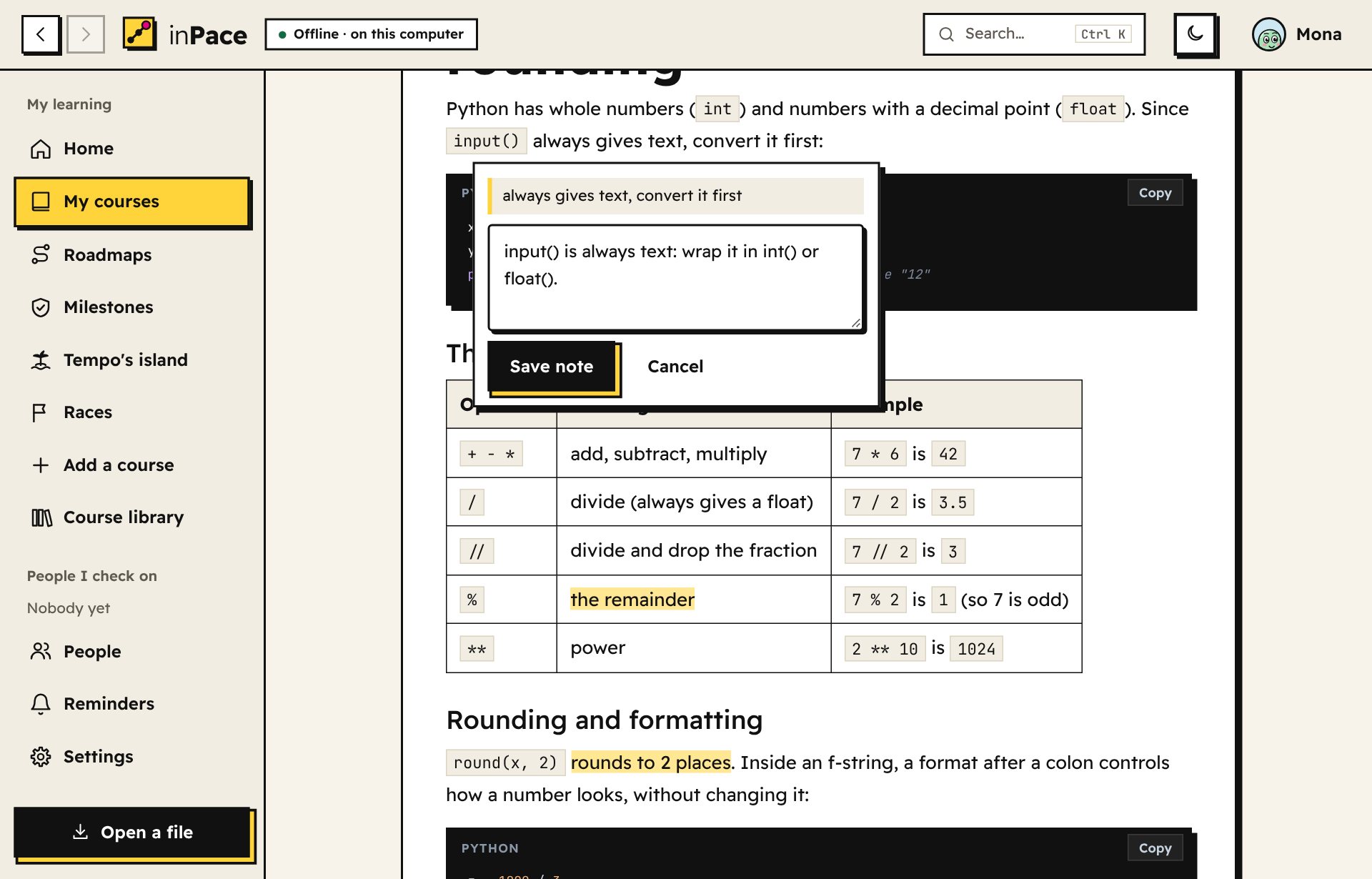
  • Take notes 1.25: select a sentence in a lesson and press Take a note. The sentence stays highlighted, your notes are at the end of each lesson, and Your notes on the course page shows them all and downloads them as a file. Only you see them.دوّن ملاحظاتك 1.25: حدّد جملة في الدرس واضغط دوّن ملاحظة. تبقى الجملة مظلَّلة، وملاحظاتك في آخر كل درس، وملاحظاتك في صفحة الدورة تعرضها كلها وتنزّلها كملف. لا يراها غيرك.
  • Optional lessons 1.25 are extras, like further reading or a long video. They're marked Optional, with Skip it at the top, and the module finishes without them. Continue shows each one once, in its place.الدروس الاختيارية 1.25 إضافات، مثل قراءة إضافية أو فيديو طويل. مكتوب عليها اختياري وفي أعلاها زر تخطَّه، والوحدة تكتمل بدونها. وزر تابع يعرض كل واحد منها مرة واحدة في مكانه.
  • Zoom any PDF your way. Fit to width, fit to page or a size from 50% to 400%; Ctrl + mouse wheel or two fingers zoom around the spot you point at; + − and 0 on the keyboard; ← → turn pages. Rotate sideways scans, and turn on night mode for dark pages. Each PDF remembers your page and zoom.كبّر أي PDF كما تحب. ملاءمة العرض أو ملاءمة الصفحة أو حجم من 50% إلى 400%، وCtrl مع عجلة الفأرة أو إصبعان يكبّران حول المكان الذي تشير إليه، و+ و− و0 من لوحة المفاتيح، و← و→ لتقليب الصفحات. دوّر الصفحات الممسوحة المائلة، وشغّل الوضع الليلي لصفحات داكنة. وكل ملف PDF يتذكر صفحتك ومستوى التكبير.
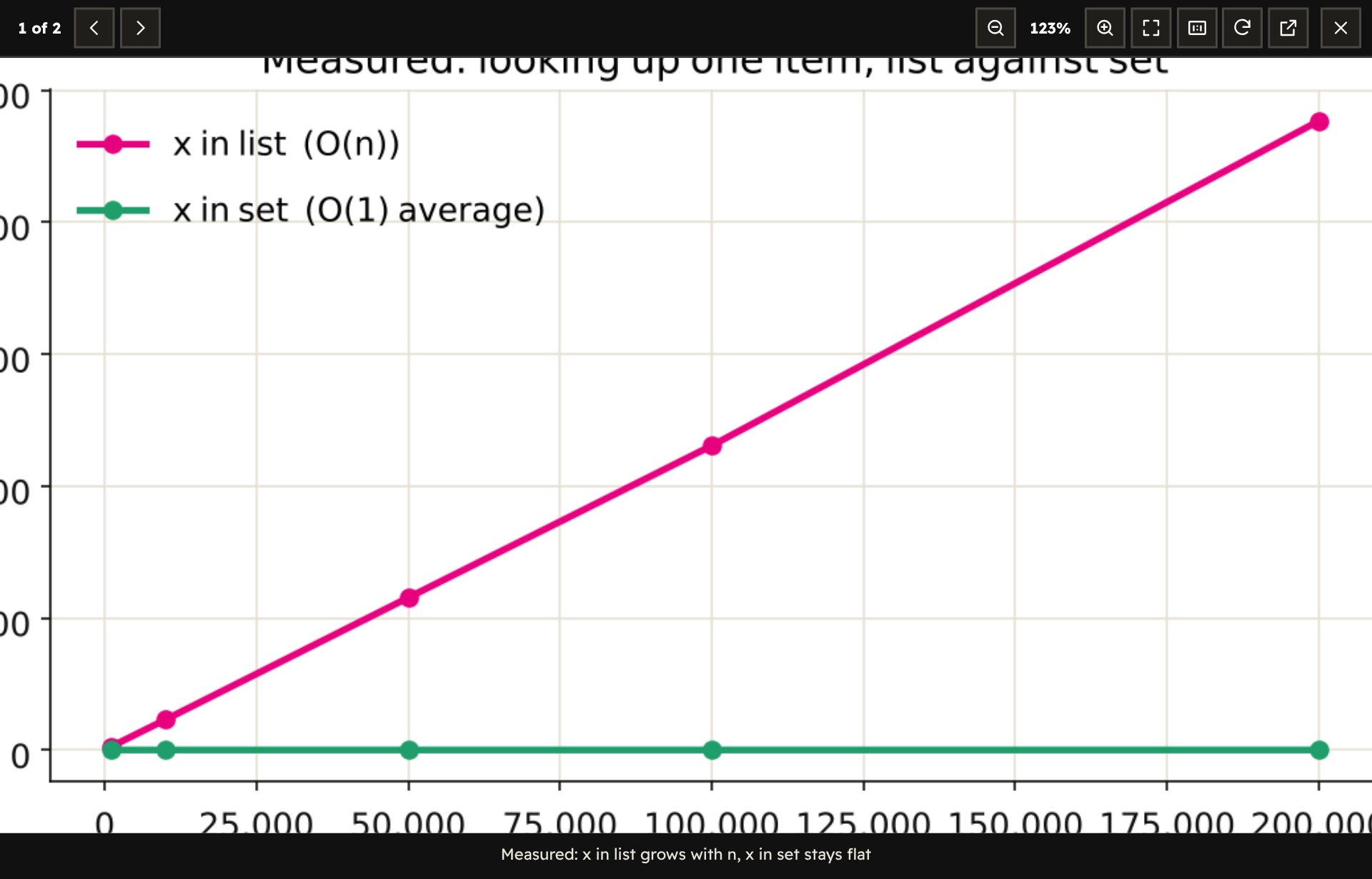
  • Pictures and charts open big. Click a picture in a lesson (or the button in its corner): it fills the screen, and you zoom with the buttons, the mouse wheel or two fingers, drag to look around, and use ← and → for the lesson's other pictures. Escape closes it.الصور والرسوم البيانية تُفتح كبيرة. اضغط على صورة في الدرس (أو الزر في ركنها): تملأ الشاشة، وتكبّرها بالأزرار أو عجلة الفأرة أو بإصبعين، وتسحبها لترى أجزاءها، وتنتقل بـ ← و→ إلى صور الدرس الأخرى. وزر Escape يغلقها.
A lesson with two highlighted sentences and the Take a note box open on a selected sentence.
The picture viewer showing a chart zoomed to 123%, with zoom, fit, rotate and close buttons.
06

Find your wayتنقّل بسهولة

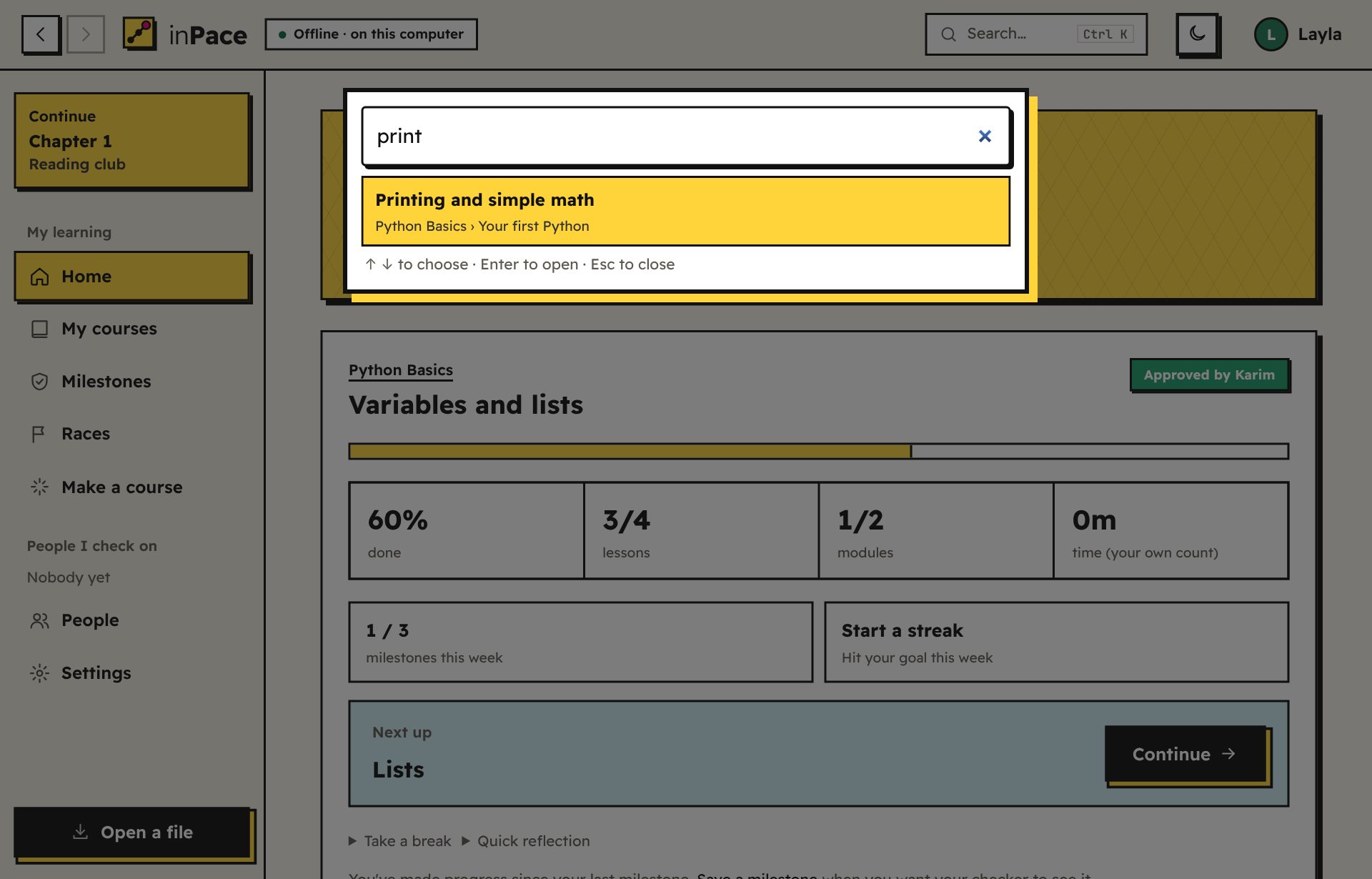
  • Search anything: press Ctrl+K or /, or click Search… at the top. Type a few letters, use ↑ ↓ to choose and Enter to open. It finds lessons, courses, tasks, people and pages, in English or Arabic.ابحث عن أي شيء: اضغط Ctrl+K أو /، أو انقر بحث… في الأعلى. اكتب بضعة أحرف، واستخدم ↑ ↓ للاختيار وEnter للفتح. يجد الدروس والدورات والمهام والأشخاص والصفحات، بالعربية أو الإنجليزية.
  • Find a course: My courses has a search box. Type part of a course, module or lesson name.ابحث عن دورة: في دوراتي مربع بحث. اكتب جزءًا من اسم دورة أو وحدة أو درس.
  • Continue: the card at the top of the sidebar always shows the lesson you were last on. One click and you're back.تابع: البطاقة أعلى الشريط الجانبي تعرض دائمًا آخر درس كنت فيه. ضغطة واحدة وتعود.
  • Home puts the course you worked on last at the top, with Continue right under its name. Your other courses keep their numbers and options under Details and options.الرئيسية تضع آخر دورة عملت عليها في الأعلى، وزر تابع تحت اسمها مباشرة. ودوراتك الأخرى تحتفظ بأرقامها وخياراتها تحت التفاصيل والخيارات.
  • The course page starts with your path. Only the module you're on is open; finished and locked modules fold into one line (tap to see their lessons). A small Download for offline button sits under Continue; the full Watch offline box, with quality and folder, is folded at the bottom.صفحة الدورة تبدأ بطريقك. الوحدة التي أنت فيها فقط مفتوحة، والوحدات المنتهية والمقفلة مطوية في سطر واحد (اضغط لترى دروسها). وتحت تابع زر صغير حمّل للمشاهدة بدون إنترنت، أما مربع شاهد بدون إنترنت الكامل، بالجودة والمجلد، فمطوي في الأسفل.
  • Course outline: under every lesson, all modules and lessons, with ✓ on the ones you finished. Click any lesson to jump there.مخطط الدورة: تحت كل درس، كل الوحدات والدروس مع ✓ على ما أنهيته. اضغط أي درس لتنتقل إليه.
  • Back and forward: the buttons at the top left take you back and forward, like in a browser. Alt+←, Alt+→ and your mouse's side buttons work too. Inside a course, Back takes you to the course page, not through every lesson you read.الرجوع والتقدّم: الزران أعلى اليسار يعيدانك للخلف وللأمام، مثل المتصفح. وتعمل أيضًا Alt+← وAlt+→ والأزرار الجانبية في الفأرة. وداخل الدورة يعيدك الرجوع إلى صفحة الدورة، لا إلى كل درس قرأته.
  • Finished a module? Press Start the next module right there. My courses shows each course as one card with how far you are and what's next: tap it to carry on.أنهيت وحدة؟ اضغط ابدأ الوحدة التالية في الصفحة نفسها. وتعرض «دوراتي» كل دورة كبطاقة واحدة فيها مدى تقدّمك والخطوة التالية: اضغطها لتكمل.
  • N and P go to the next and previous lesson.N وP للدرس التالي والسابق.
The search box open over the home page, finding a lesson.
07

Update or delete a courseحدّث دورة أو احذفها

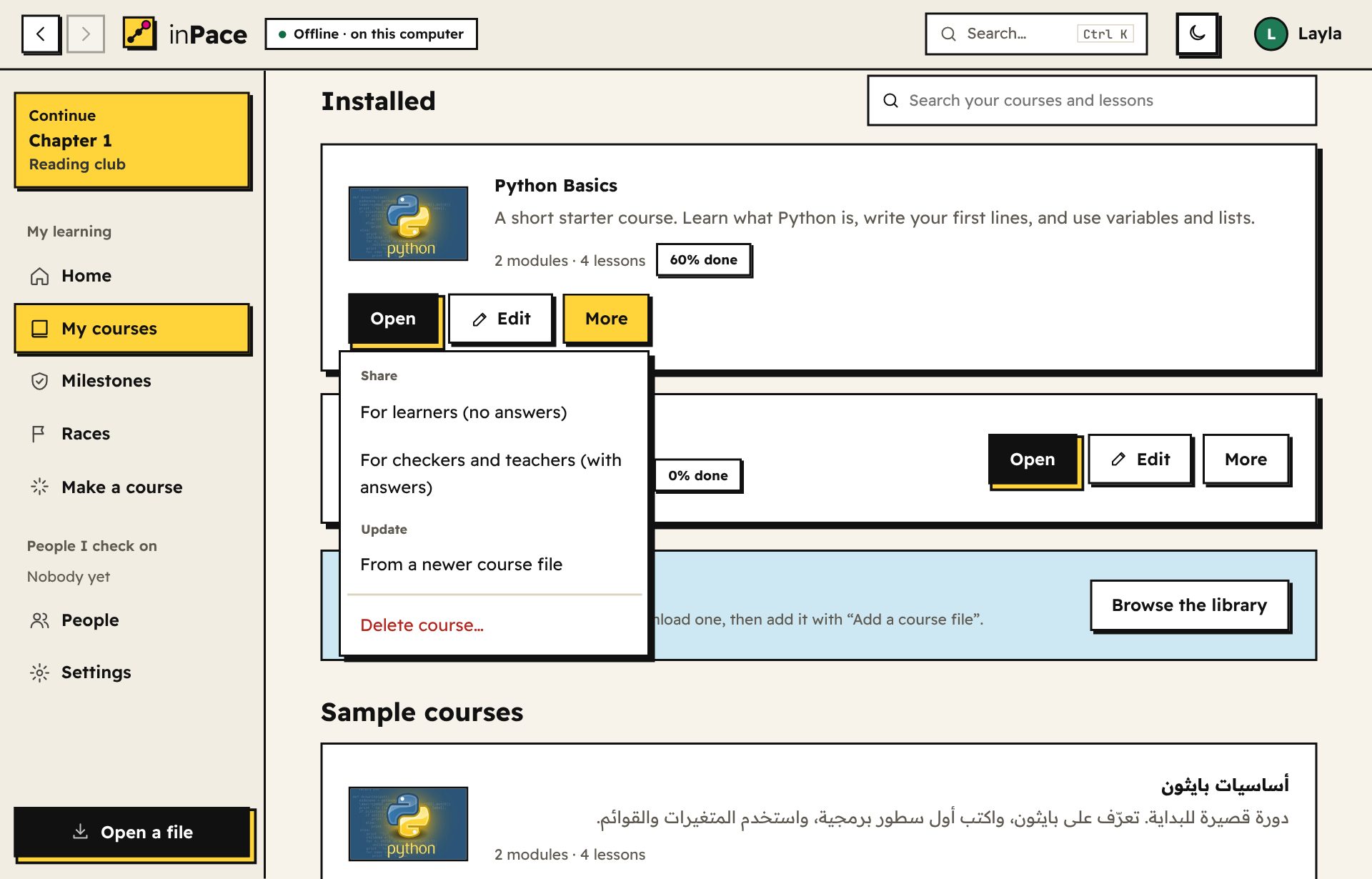
In My courses, each course has Open, Edit and More. More holds Share, Update and Delete.في دوراتي، لكل دورة افتح وعدّل والمزيد. وفي "المزيد" المشاركة والتحديث والحذف.

  • A newer version arrived? Just open the new course file. inPace shows what was added and removed, then you choose: Update my course (your progress is kept), Add it as a separate course, or Keep mine as it is. Changed your mind? Undo last change in the builder brings the old version back.وصلتك نسخة أحدث؟ افتح ملف الدورة الجديد فقط. يعرض inPace ما أُضيف وما حُذف، ثم تختار: حدّث دورتي (يبقى تقدّمك)، أو أضفها كدورة منفصلة، أو أبقِ دورتي كما هي. غيّرت رأيك؟ تراجع عن آخر تغيير في المحرر يعيد النسخة القديمة.
  • Added videos to a course folder? Use More → Refresh from its folder. New videos become new lessons, and everything you did stays.أضفت فيديوهات لمجلد دورة؟ استخدم المزيد ← حدّث من مجلدها. الفيديوهات الجديدة تصبح دروسًا جديدة، وكل ما فعلته يبقى.
  • Done with a course? Use More → Delete course. If you started it, inPace shows your progress and asks you to tick a box first. Milestones you already sent stay with your checker, and your video folders are never touched. There's a link to make a backup first.انتهيت من دورة؟ استخدم المزيد ← احذف الدورة. إن كنت بدأتها، يعرض inPace تقدّمك ويطلب منك وضع علامة في مربع أولًا. المحطات التي أرسلتها تبقى عند متابِعك، ومجلدات الفيديو عندك لا تُلمس أبدًا. وهناك رابط لعمل نسخة احتياطية أولًا.
My courses, with the More menu open on a course showing Share options.
08

Stay on trackحافظ على الإيقاع

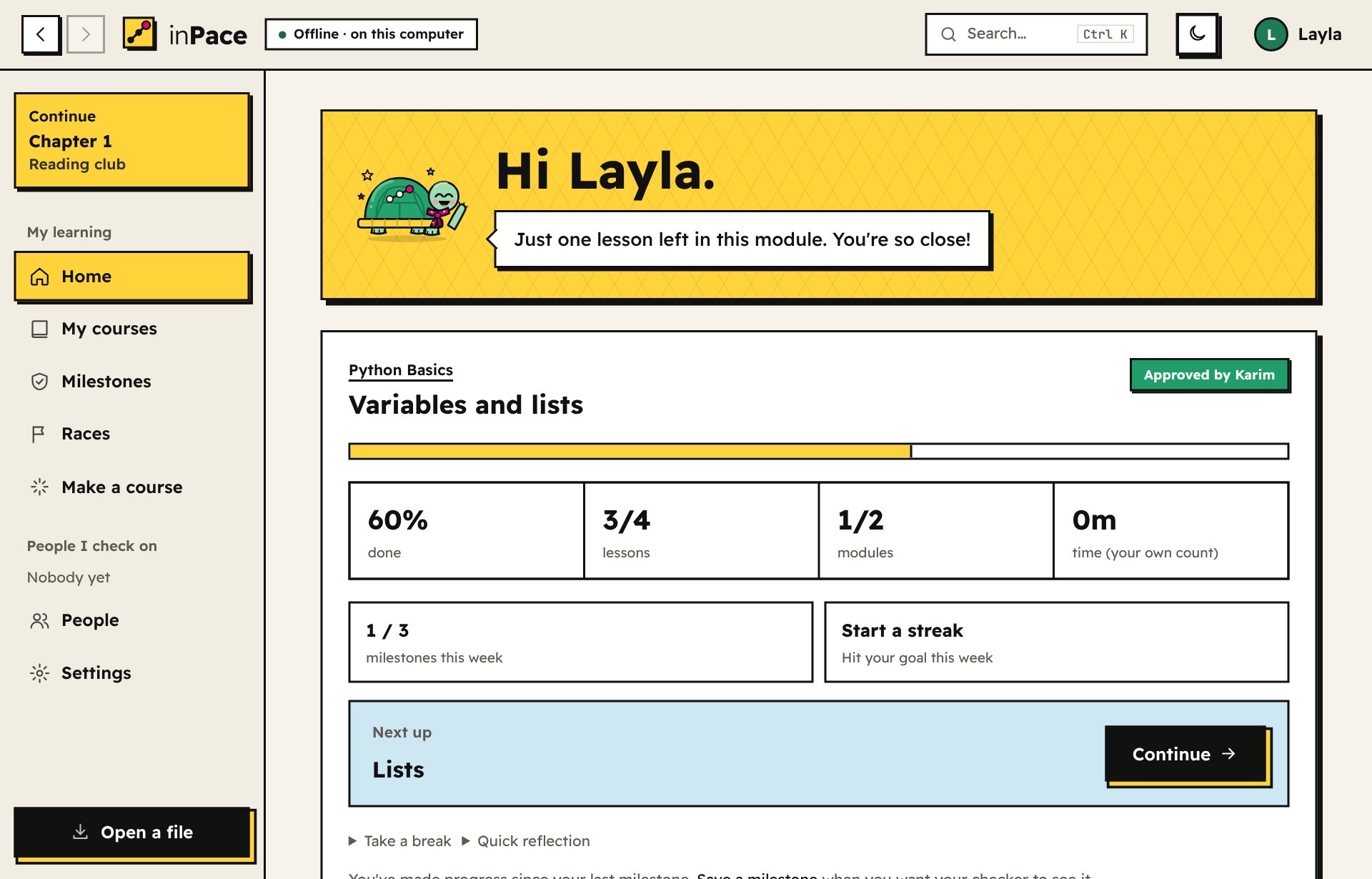
  • Set a weekly goal: how many milestones you'll save each week. Home shows this week's count and your streak.حدّد هدفًا أسبوعيًا: كم محطة ستحفظ كل أسبوع. تعرض الرئيسية عدد هذا الأسبوع وسلسلتك.
  • Take a break when life happens. Weeks on a break don't count as missed, and your streak survives.خذ استراحة عندما تنشغل. أسابيع الاستراحة لا تُحسب فائتة، وتبقى سلسلتك.
  • See your finish date at your current pace, and a short reflection after each module.اعرف موعد إنهائك بإيقاعك الحالي، مع تأمل قصير بعد كل وحدة.
The Home page with Tempo, course progress, the weekly goal and the next lesson.
09

Reminders and alarmsالتذكيرات والمنبّهات

Open Reminders in the sidebar (on a phone: More → Reminders).افتح التذكيرات من القائمة الجانبية (على الهاتف: المزيد ← التذكيرات).

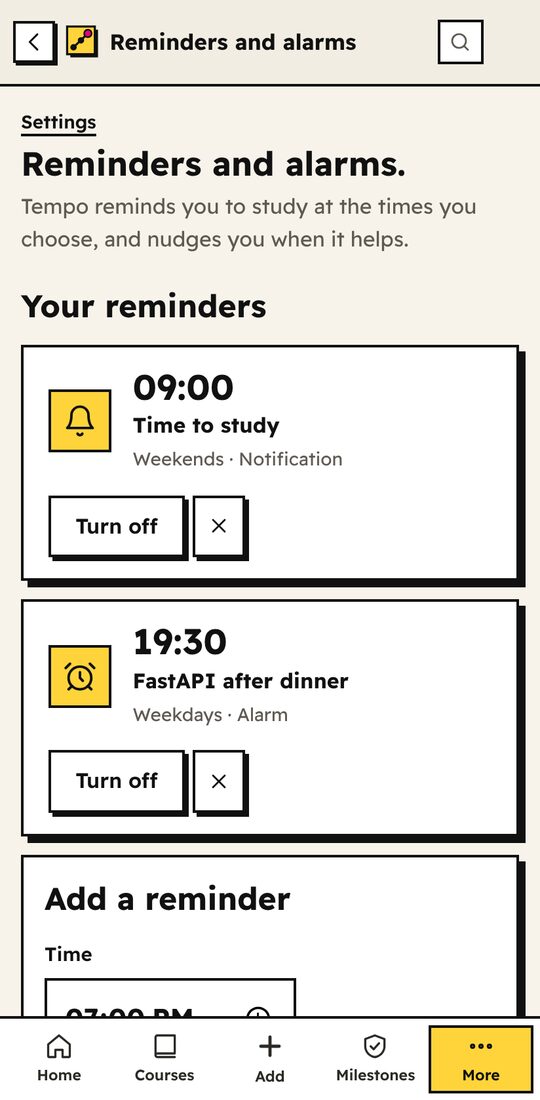
  • Get reminded: open Reminders and pick a time and days. Each reminder is a notification or an alarm that rings until you stop it or snooze it for 10 minutes. It works on your computer and phone even when inPace is closed. Press Try it to hear it.احصل على تذكير: افتح التذكيرات واختر وقتًا وأيامًا. كل تذكير إما إشعار أو منبّه يرنّ حتى توقفه أو تؤجله 10 دقائق. يعمل على الكمبيوتر والهاتف حتى لو كان inPace مغلقًا. اضغط جرّبه لتسمعه.
  • Tempo nudges you in the evening when it helps: when he misses you after a week away, when your weekly goal is at risk, when questions are ready for review, and when a finished module needs a milestone. Turn off any of them on the Reminders page.تيمبو ينبّهك في المساء حين يفيدك ذلك: عندما يشتاق إليك بعد أسبوع غياب، وعندما يكون هدفك الأسبوعي في خطر، وعندما تجهز أسئلة للمراجعة، وعندما تحتاج وحدة أنهيتها إلى محطة. أوقف أيًّا منها من صفحة التذكيرات.
  • Add one: choose the time and days, then a notification (a normal notification with a sound) or an alarm (rings until you press Stop or Snooze 10 min). Give it a name if you like, such as "FastAPI after dinner".أضف تذكيرًا: اختر الوقت والأيام، ثم إشعار (إشعار عادي بصوت) أو منبّه (يرنّ حتى تضغط إيقاف أو أجّل 10 دقائق). سمّه إن شئت، مثل «FastAPI بعد العشاء».
  • Each reminder tells you what's next, like Next: "Lists" in Python Basics. Tap it and inPace opens on that lesson.كل تذكير يخبرك بما يليه، مثل التالي: «القوائم» في أساسيات بايثون. اضغط عليه ويفتح inPace على ذلك الدرس.
  • Turn off a reminder for a while, or delete it with ×. When you come back after a few days away, Tempo says welcome back on Home.أوقف تذكيرًا لفترة، أو احذفه بعلامة ×. وعندما تعود بعد أيام من الغياب، يرحّب بك تيمبو في الرئيسية.
  • First time on a Mac? The first notification may ask you to allow notifications from "Script Editor", the Mac tool that shows them. Allow it once.أول مرة على ماك؟ قد يطلب أول إشعار السماح بإشعارات «Script Editor»، وهي أداة ماك التي تعرضها. اسمح بها مرة واحدة.
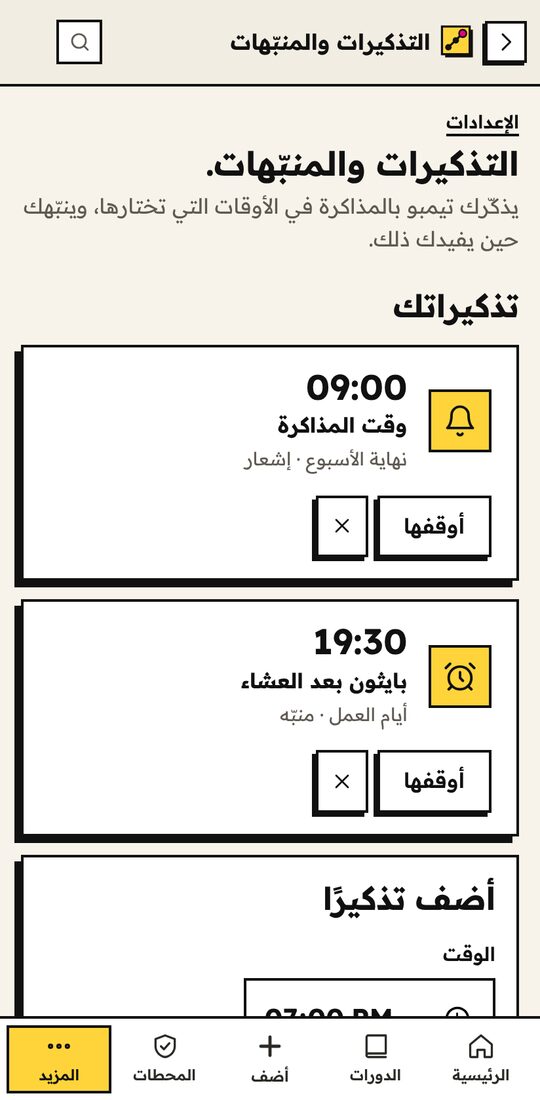
The Reminders page on a phone, with a weekend notification and a weekday alarm. صفحة التذكيرات على الهاتف، مع إشعار نهاية الأسبوع ومنبّه أيام العمل.
10

Tempo's islandجزيرة تمبو

A reward for studying, if you want one. Open Tempo's island in the sidebar (under More on a phone) and turn it on. It's off until you do.مكافأة على المذاكرة، إن أردتها. افتح جزيرة تمبو من الشريط الجانبي (أو من المزيد على الهاتف) وشغّلها. تبقى مطفأة حتى تفعل.

  • Focus trips: pick a plant, a length (10 to 90 minutes) and, if you like, the course you're studying. While you work, Tempo swims and the plant grows on his shell. When the time is up, it joins the island. Longer trips grow bigger plants; an hour or more grows fruit or flowers. On Android, the countdown shows in a notification with Tempo and keeps going while you use other apps.رحلات التركيز: اختر نبتة ومدة (من 10 إلى 90 دقيقة)، والدورة التي تذاكرها إن أردت. بينما تعمل، يسبح تمبو وتنمو النبتة على صدفته. وحين ينتهي الوقت، تنضم إلى الجزيرة. الرحلات الأطول تنمّي نباتات أكبر، وساعة أو أكثر تطرح ثمارًا أو زهورًا. وعلى أندرويد يظهر العد التنازلي في إشعار مع تمبو ويستمر وأنت تستخدم تطبيقات أخرى.
  • Study anywhere or phone down: "Study anywhere" keeps the clock running even if you leave inPace. "Phone down" only counts time while the trip screen is open.ذاكر في أي مكان أو الهاتف جانبًا: «ذاكر في أي مكان» يبقي المؤقت يعمل حتى لو تركت inPace. و«الهاتف جانبًا» يحسب الوقت فقط وشاشة الرحلة مفتوحة.
  • Stopping early is fine. Press Rest for now and the sprout keeps its minutes for next time.التوقف مبكرًا لا بأس به. اضغط استرح الآن فتحتفظ النبتة بدقائقها للمرة القادمة.
  • 14 plants and 9 friends. New plants open with focus goals (a 60-minute trip, 3 days in a row). Friends come from learning: Zoon the snail after your first lesson, Boomy the owl when your checker approves a milestone, Kaboria the crab when you finish a course, Nawras the seagull at your first port on a roadmap.14 نبتة و9 أصدقاء. تُفتح النباتات الجديدة بأهداف التركيز (رحلة 60 دقيقة، 3 أيام متتالية). ويأتي الأصدقاء من التعلم: زون الحلزون بعد أول درس، وبومي البومة حين يوافق متابِعك على محطة، وكابوريا حين تكمل دورة، ونورس الطائر عند أول ميناء في مسارك.
  • Voyages 1.24: the second view of the island. Every roadmap you follow is a sea route with a port for each course. Finished courses light their lighthouse (10 shells), Tempo sails his boat to the next port, and the harbour at the end opens a chest of 100 shells.الرحلات 1.24: القسم الثاني من الجزيرة. كل مسار تتابعه طريق بحري فيه ميناء لكل دورة. الدورات المكتملة تضيء منارتها (10 أصداف)، ويُبحر تمبو بقاربه إلى الميناء التالي، والميناء الأخير يفتح صندوقًا فيه 100 صدفة.
  • One island, your name for it. Every trip grows on Tempo's island, whatever you're studying. Press Rename above it to give it a name.جزيرة واحدة باسمك. كل رحلة تنمو على جزيرة تمبو، أيًا كان ما تذاكره. اضغط أعد التسمية فوقها لتعطيها اسمًا.
  • Your courses pay off. Lessons, modules and finished courses give shells. Each course hides treasure chests at 25%, 50% and 75%, and a finished course puts a trophy on your island. Each course counts once, even if you start it again.دوراتك تكافئك. الدروس والوحدات والدورات المكتملة تعطي أصدافًا. وفي كل دورة صناديق كنز عند 25% و50% و75%، والدورة المكتملة تضع كأسًا على جزيرتك. وكل دورة تُحسب مرة واحدة، حتى لو بدأتها من جديد.
  • Shells and the shop. Spend shells on new ground, skies, seas, and things like lanterns, a hut or a lighthouse. A crown or a wizard hat for your own turtle, too.الأصداف والمتجر. أنفق الأصداف على أرض وسماء وبحر جديدة، وأشياء مثل الفوانيس أو كوخ أو منارة. وتاج أو قبعة ساحر لسلحفاتك أيضًا.
  • Share it. People you add see your island (and you see theirs) from the People page. Share my island makes a picture of it to send anywhere. Keep it private in Island settings if you prefer.شاركها. من تضيفهم يرون جزيرتك (وترى جزرهم) من صفحة الأشخاص. وشارك جزيرتي يصنع صورة لها ترسلها لأي مكان. ويمكنك إبقاؤها خاصة من إعدادات الجزيرة.
  • The story: ten chapters and a few surprises, from the bay to the Far Shore, against the Fog of Someday. Pick the world in the logbook: the Sea of Things to Learn, or Alexandria and the Great Green Sea.القصة: عشرة فصول وبعض المفاجآت، من الخليج إلى الشاطئ البعيد، في مواجهة «ضباب بكرة». اختر العالم من دفتر الرحلة: بحر المعرفة، أو الإسكندرية والبحر الأخضر العظيم.
  • Your pace is the weather. After 2 days away a mist rolls in, after 4 the fog is thick and the friends sleep, and new chapters wait. Come back and it lifts. Keep your weekly goal and you get fair winds.إيقاعك هو الطقس. بعد يومين من الغياب يزحف ضباب خفيف، وبعد أربعة يكثف الضباب وينام الأصدقاء وتنتظر الفصول الجديدة. عُد فينقشع. وحقق هدفك الأسبوعي تهب رياح طيبة.
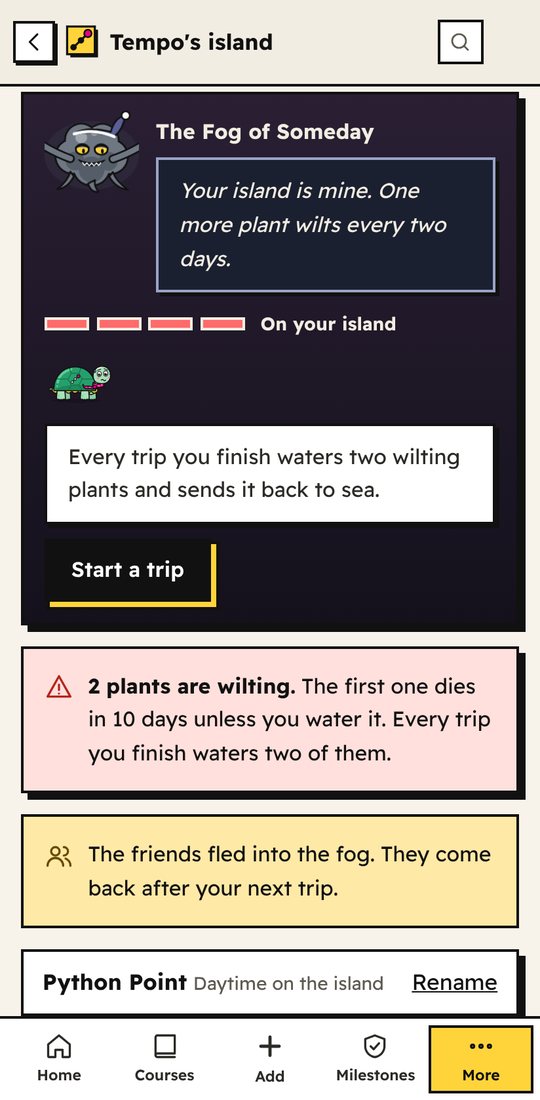
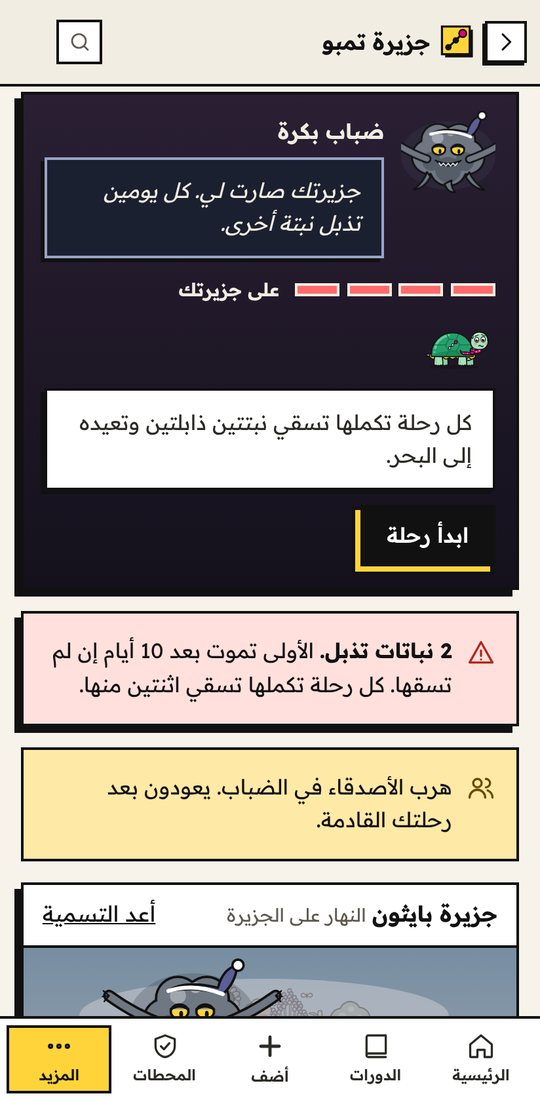
  • The villain is real. The Fog has a face, and it comes closer the longer you're away: at your shore after 7 days, on the island after 10. Then your plants wilt, one more every 2 days, and a wilting plant dies two weeks later. Every trip you finish waters two of them. For hard weeks, turn on Gentle sea in Island settings.الشرير حقيقي. للضباب وجه، ويقترب كلما طال غيابك: على شاطئك بعد 7 أيام، وعلى الجزيرة بعد 10. ثم تذبل نباتاتك، واحدة كل يومين، والنبتة الذابلة تموت بعد أسبوعين. كل رحلة تكملها تسقي اثنتين منها. وللأسابيع الصعبة، شغّل البحر الهادئ من إعدادات الجزيرة.
  • A real sky. Dawn, day, sunset and night follow your clock, and the seasons bring snow, petals or falling leaves. On days you study, someone swims by.سماء حقيقية. الفجر والنهار والغروب والليل تتبع ساعتك، والفصول تأتي بالثلج أو البتلات أو أوراق الخريف. وفي الأيام التي تذاكر فيها، يمر أحدهم سابحًا.
Tempo's island on a phone after 13 days away: the Fog of Someday says the island is its, a danger meter shows it's on the island, Tempo answers, and a warning says 2 plants are wilting. جزيرة تمبو على الهاتف بعد 13 يومًا من الغياب: ضباب بكرة يقول إن الجزيرة صارت له، ومقياس الخطر يبين أنه على الجزيرة، وتمبو يرد، وتنبيه بأن نبتتين تذبلان.
11

Get checked by someone you trustمتابعة من شخص تثق به

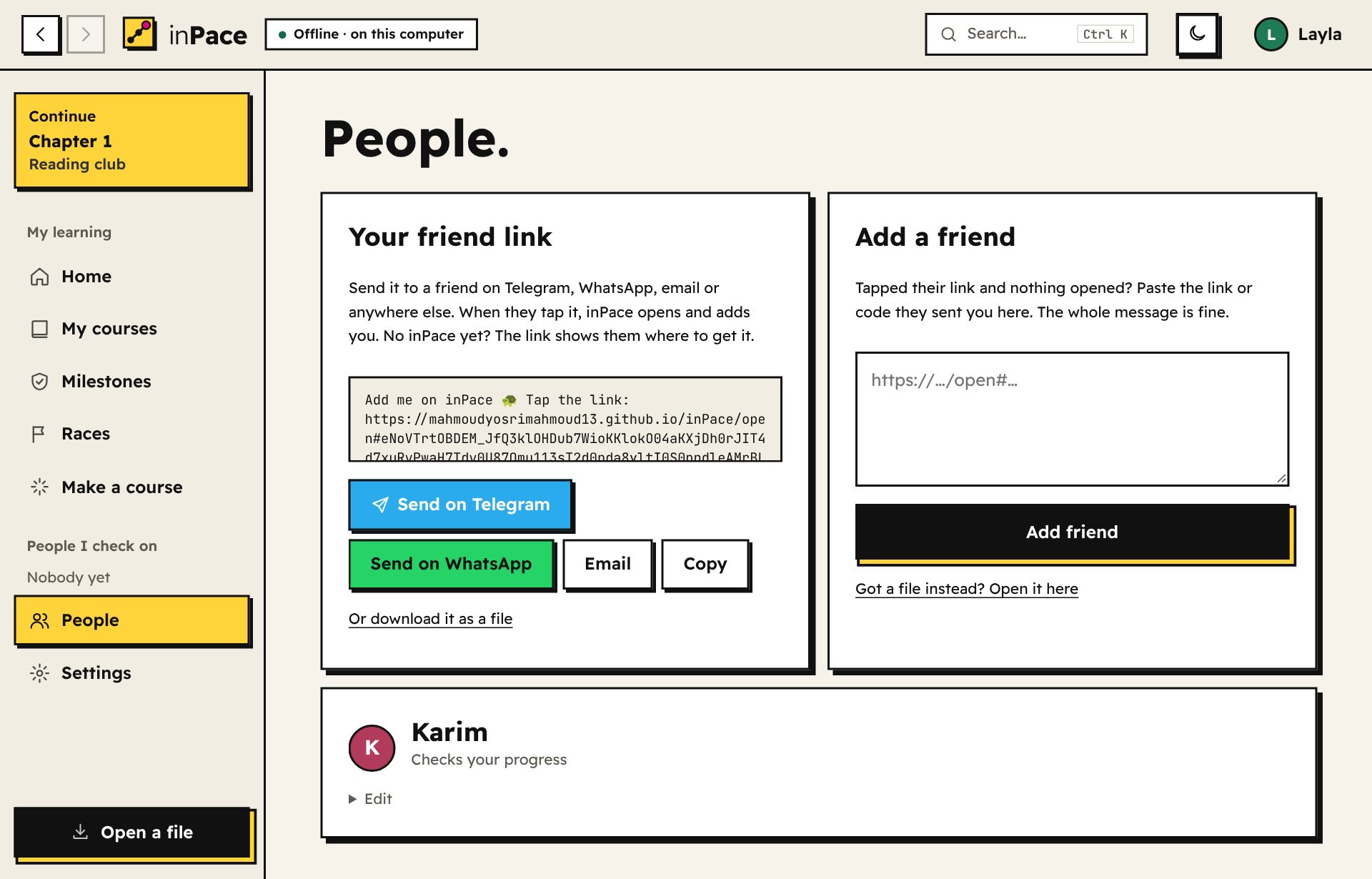
  1. Connect. In People, send your friend link on Telegram, WhatsApp or email. Your checker taps it, inPace opens and adds you, and one more tap sends their link back. No inPace yet? The link shows them where to get it. A checker can be a friend, a parent or a mentor. They don't need to know the subject.اتصلا. من الأشخاص، أرسل رابط صداقتك على تيليجرام أو واتساب أو البريد. يضغطه متابِعك فيفتح inPace ويضيفك، وبضغطة أخرى يرسل لك رابطه. ليس لديه inPace بعد؟ الرابط يريه من أين يحمّله. المتابِع قد يكون صديقًا أو أحد الوالدين أو مرشدًا، ولا يحتاج أن يعرف المادة.
  2. Save a milestone when you finish part of the course. It's signed and linked to the one before, so the history can't be quietly rewritten.احفظ محطة عندما تنهي جزءًا من الدورة. إنها موقّعة ومرتبطة بالتي قبلها، فلا يمكن تغيير السجل في الخفاء.
  3. Send your progress link from Milestones. It only carries what your checker hasn't seen yet, and they see exactly what you did: lessons, files, answers and scores. If it's ever too big for a link, inPace gives you a file instead.أرسل رابط تقدّمك من المحطات. يحمل فقط ما لم يره متابِعك بعد، فيرى ما فعلته بالضبط: الدروس والملفات والإجابات والدرجات. وإن كان أكبر من أن يُرسل كرابط، يعطيك inPace ملفًا بدلًا منه.
  4. They approve, ask a question, or flag a problem, and send their reply back as a link. They can also send a verified exam that only their app can grade, or ask to see your files.يوافق أو يسأل أو يبلغ عن مشكلة، ويرسل ردّه كرابط. ويمكنه أيضًا إرسال اختبار موثّق لا يصحّحه إلا تطبيقه، أو طلب رؤية ملفاتك.
  5. Share your learning record: one web page that checks its own signatures, for a CV or a class.شارك سجل تعلّمك: صفحة ويب واحدة تفحص توقيعاتها بنفسها، لسيرة ذاتية أو فصل دراسي.
The People page with a friend link and Send on Telegram, Send on WhatsApp, Email and Copy buttons.
12

Race friendsسابق أصدقاءك

  • A pace race rewards the most weeks on target. A points race rewards the most of your course finished during the race.سباق الوتيرة يكافئ أكثر أسابيع تحقق فيها هدفك. وسباق النقاط يكافئ أكبر جزء تنهيه من دورتك خلال السباق.
  • Only approved milestones count, so nobody can fake their way to first place.تُحسب فقط المحطات الموافق عليها، فلا يستطيع أحد الغش للوصول للمركز الأول.
  • Invite friends with a code, send cheers, and earn badges along the way.ادعُ أصدقاءك بكود، وأرسل تشجيعًا، واكسب شارات في الطريق.
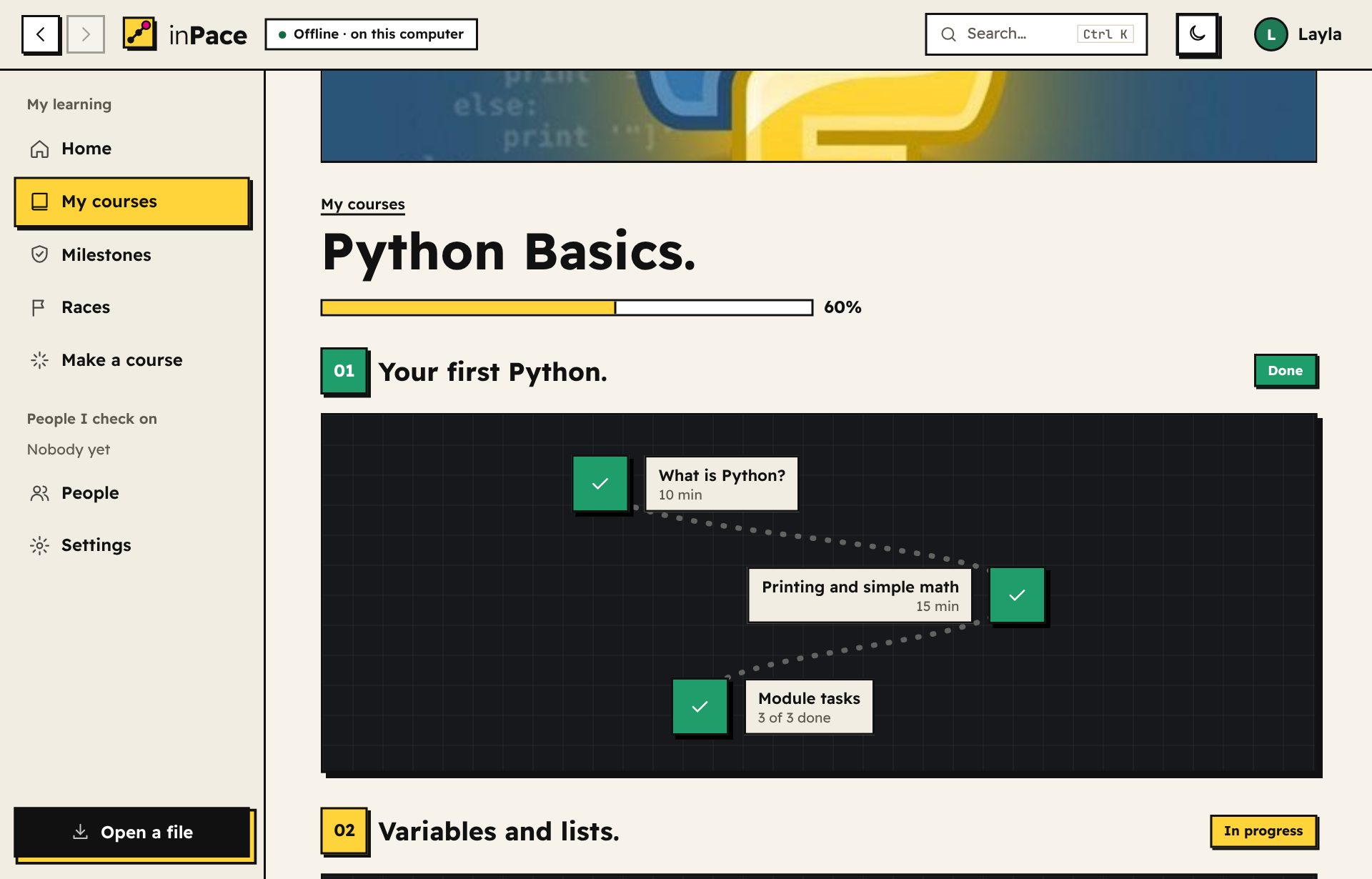
A course shown as a trail of lesson stones.
13

Make your own courseاصنع دورتك

  • Start with just a title, or paste a list of videos and get a lesson for each.ابدأ بعنوان فقط، أو الصق قائمة فيديوهات لتحصل على درس لكل واحد.
  • Add a picture in Course details so your courses are easy to tell apart. A folder course uses a cover.jpg in the folder by itself.أضف صورة من تفاصيل الدورة لتميّز دوراتك بسهولة. ودورة المجلد تستخدم ملف cover.jpg الموجود في المجلد تلقائيًا.
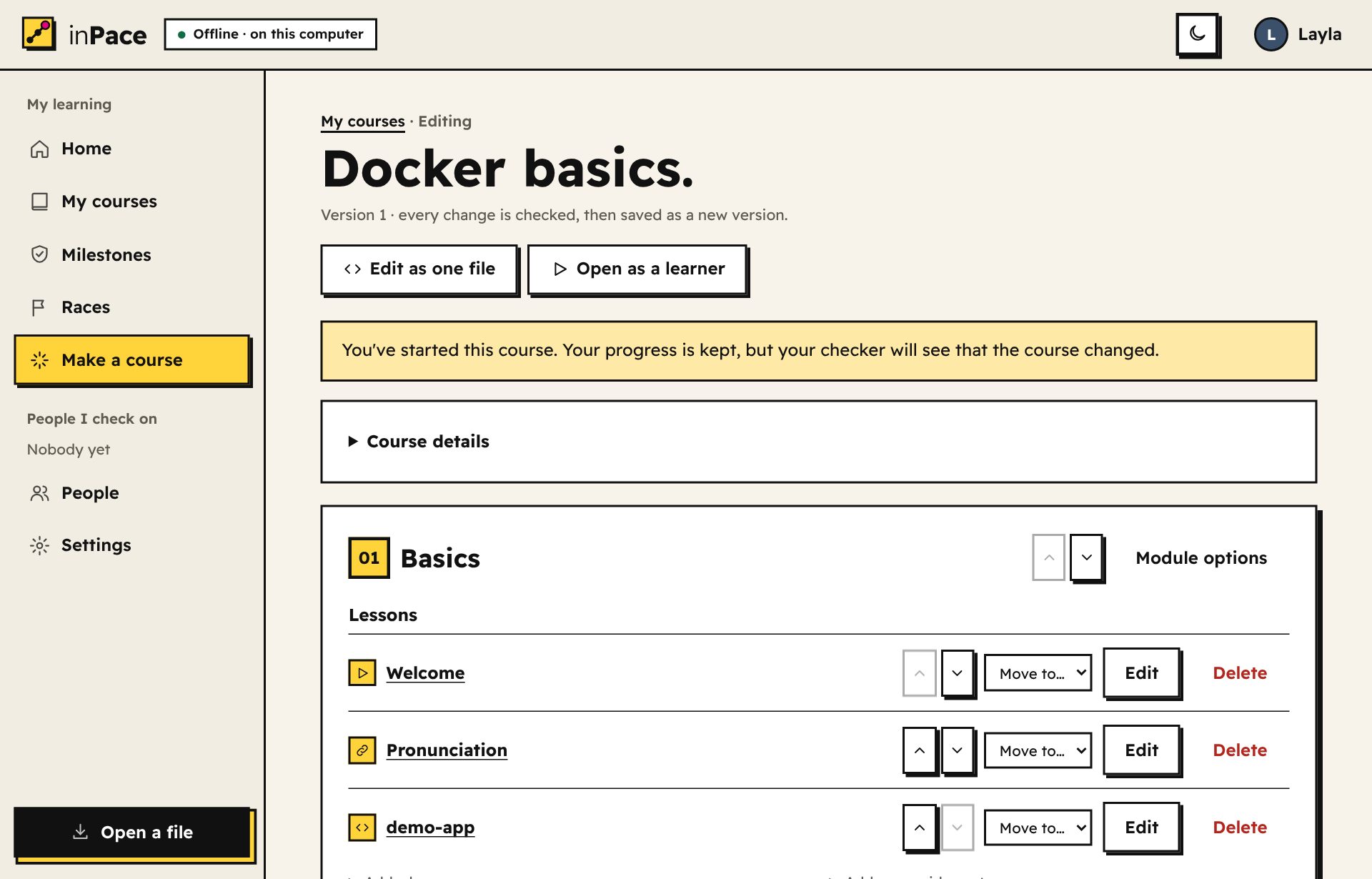
  • Move anything: modules, lessons and tasks go up and down, and lessons can move to another module.انقل أي شيء: الوحدات والدروس والمهام تتحرك لأعلى ولأسفل، والدروس تنتقل لوحدة أخرى.
  • Write lessons with a toolbar (headings, bold, lists, code, links, videos) and a live preview.اكتب الدروس بشريط أدوات (عناوين، عريض، قوائم، كود، روابط، فيديوهات) مع معاينة مباشرة.
  • Mark extras optional 1.25: tick Optional lesson on a lesson (or a task) for further reading, a long video or a bonus exercise. The module finishes without it. Keep the core teaching in lessons that aren't optional, and put any video on top of a lesson whose text explains the same thing, so watching it is a choice.اجعل الإضافات اختيارية 1.25: علّم درس اختياري على الدرس (أو المهمة) للقراءة الإضافية أو الفيديو الطويل أو التمرين الإضافي. والوحدة تكتمل بدونه. واترك الشرح الأساسي في دروس غير اختيارية، وضع أي فيديو أعلى درس يشرح نصه الشيء نفسه، فتصبح مشاهدته اختيارًا.
  • Quizzes with many right answers: each quiz shows one right answer mixed with wrong ones. Change questions and tasks any time.اختبارات بأكثر من إجابة صحيحة: يُظهر كل اختبار إجابة صحيحة واحدة بين الخاطئة. وغيّر الأسئلة والمهام متى شئت.
  • Undo brings back the version before any change, and Edit as one file shows the whole course as text for quick big edits.التراجع يعيد النسخة السابقة لأي تغيير، والتعديل كملف واحد يعرض الدورة كلها نصًا لتعديلات كبيرة سريعة.
  • Publish it to the library with More → Publish to the library, so anyone can add it. It's signed with your key, so only you can update it. Big videos? Upload them to Google Drive, MEGA or archive.org and add the link in Course details.انشرها في المكتبة من المزيد ← انشر في المكتبة، ليضيفها أي شخص. إنها موقّعة بمفتاحك، فأنت فقط من يحدّثها. فيديوهات كبيرة؟ ارفعها إلى Google Drive أو MEGA أو archive.org وأضف الرابط في تفاصيل الدورة.
  • Share it without answers for learners, with answers for checkers, or with its videos inside for small courses.شاركها بدون إجابات للمتعلمين، أو مع الإجابات للمتابِعين، أو مع فيديوهاتها داخلها للدورات الصغيرة.
The course builder with move up and down buttons, Move to module, Edit and Delete for each lesson.
14

Make it yoursاجعله على ذوقك

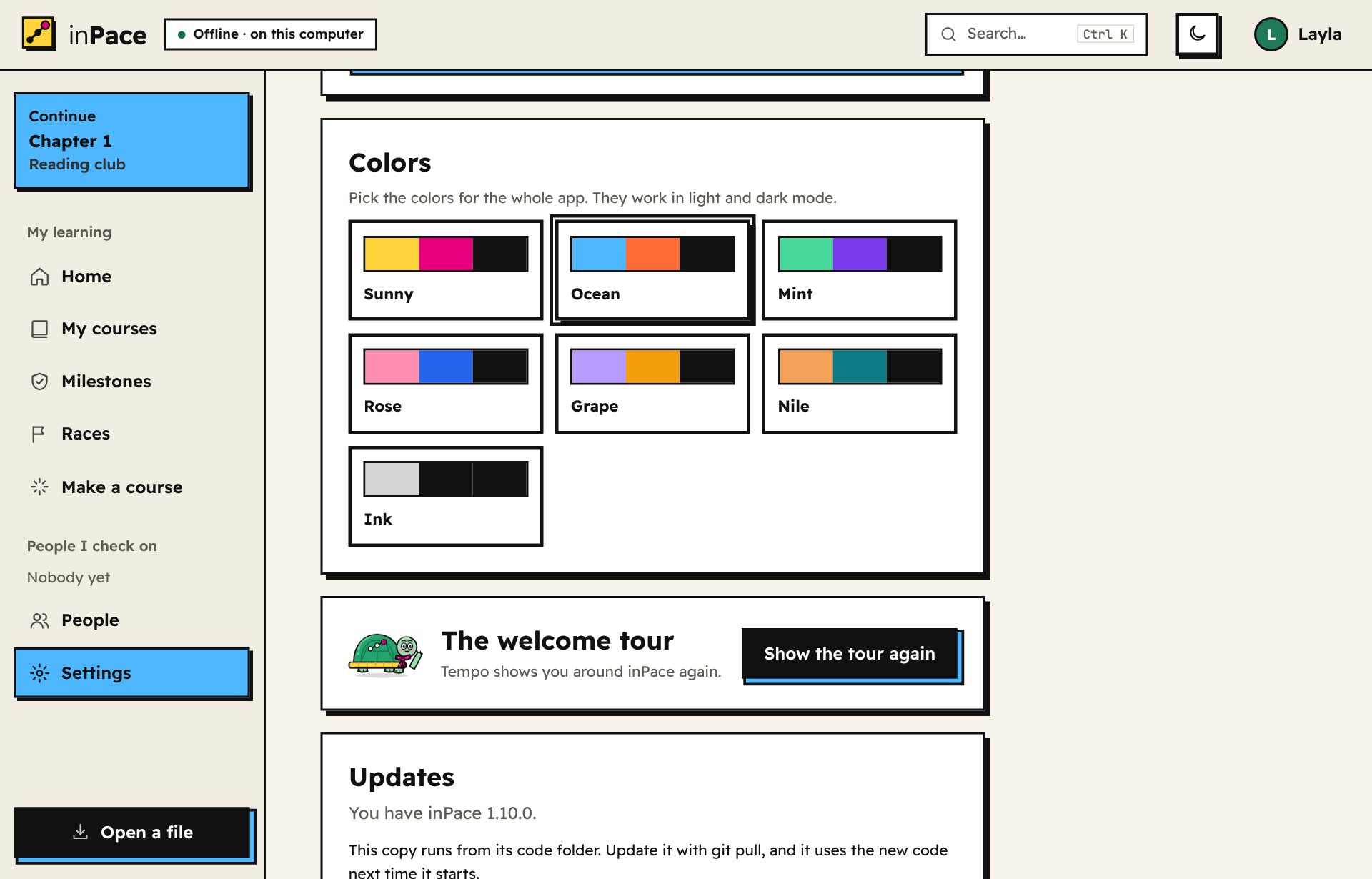
  • Colors: Settings → Colors has seven profiles: Sunny, Ocean, Mint, Rose, Grape, Nile and Ink. Each one recolors the whole app and has its own dark-mode shades.الألوان: في الإعدادات ← الألوان سبعة أنماط: Sunny وOcean وMint وRose وGrape وNile وInk. كل نمط يلوّن التطبيق كله، وله درجاته في الوضع الداكن.
  • Dark mode: the moon button at the top switches it on and off.الوضع الداكن: زر القمر في الأعلى يشغّله ويطفئه.
  • Language: English or Arabic. In Arabic the whole app goes right to left.اللغة: العربية أو الإنجليزية. وبالعربية يصبح التطبيق كله من اليمين لليسار.
  • The tour: Settings → Show the tour again brings Tempo back to walk you through.الجولة: الإعدادات ← اعرض الجولة مرة أخرى يعيد Tempo ليأخذك في جولة.
Settings, Colors: seven color profiles with Ocean chosen.
15

On your phoneعلى هاتفك

The Android app is the whole of inPace. It runs on your phone with no account and no internet, just like on a computer.تطبيق أندرويد هو inPace كاملًا. يعمل على هاتفك بلا حساب ولا إنترنت، تمامًا كما على الكمبيوتر.

  • Install: on your phone, open the download page and tap Download for Android. Open the file and tap Install. If your phone asks, allow installing apps from your browser or Files app. It needs Android 7 or newer.التثبيت: افتح صفحة التحميل من هاتفك واضغط حمّل لأندرويد. افتح الملف واضغط تثبيت. إذا سألك الهاتف، اسمح بتثبيت التطبيقات من المتصفح أو تطبيق الملفات. يحتاج أندرويد 7 أو أحدث.
  • Starting: Tempo waves on the splash screen while inPace gets ready, usually in a second or two (a little longer the very first time). To see how long your phone took, open Settings → Where your data lives → Show details.التشغيل: يلوّح لك تمبو في شاشة البداية بينما يستعد inPace، وعادةً يأخذ ثانية أو ثانيتين (وأطول قليلًا في أول مرة). لترى كم استغرق هاتفك، افتح الإعدادات ← أين تُحفظ بياناتك ← أظهر التفاصيل.
  • Getting around: the tab bar at the bottom has Home, Courses, Add and Milestones. More has races, the course library, people, Open a file, Settings and dark mode. The phone's back button goes back inside inPace.التنقل: شريط الأسفل فيه الرئيسية والدورات وإضافة والمحطات. وفي المزيد السباقات ومكتبة الدورات والأشخاص وفتح ملف والإعدادات والوضع الداكن. زر الرجوع في الهاتف يرجع داخل inPace.
  • Adding your class material: tap Add, then Some files I pick to choose files (inPace keeps a copy), or A folder on this device to use a folder where it is. For a folder, Android asks for "All files access" once; inPace only reads the folders you choose.إضافة مادتك الدراسية: اضغط إضافة، ثم ملفات أختارها لاختيار ملفات (يحتفظ inPace بنسخة)، أو مجلد على هذا الجهاز لاستخدام مجلد في مكانه. للمجلد يطلب أندرويد إذن «الوصول لكل الملفات» مرة واحدة، وinPace يقرأ فقط المجلدات التي تختارها.
  • Files inPace makes (progress files, course files, backups) open a small menu: Send it to WhatsApp, Telegram or email, or Save it on this phone.الملفات التي يصنعها inPace (ملفات التقدم والدورات والنسخ الاحتياطية) تفتح قائمة صغيرة: أرسله عبر واتساب أو تيليجرام أو البريد، أو احفظه على هذا الهاتف.
  • Reminders and alarms arrive as Android notifications, even when inPace is closed. The first time, tap Allow notifications on the Reminders page. An alarm rings until you tap Stop or Snooze 10 min, also on the lock screen.التذكيرات والمنبّهات تصل كإشعارات أندرويد، حتى لو كان inPace مغلقًا. في المرة الأولى اضغط اسمح بالإشعارات في صفحة التذكيرات. يرنّ المنبّه حتى تضغط إيقاف أو أجّل 10 دقائق، حتى على شاشة القفل.
  • Links from your checker or friends open straight in inPace. Voice notes ask for the microphone the first time, and videos can go full screen.الروابط من متابِعك أو أصدقائك تفتح مباشرة في inPace. الملاحظات الصوتية تطلب الميكروفون أول مرة، والفيديوهات تفتح بملء الشاشة.
  • Updating: the phone app doesn't update itself. Download the new version from this site and tap Update. Your courses and progress stay.التحديث: تطبيق الهاتف لا يحدّث نفسه. حمّل النسخة الجديدة من هذا الموقع واضغط تحديث. تبقى دوراتك وتقدمك.
  • Phone and computer: they don't sync by themselves. To move, make a backup in Settings on one and restore it on the other.الهاتف والكمبيوتر: لا يتزامنان تلقائيًا. للانتقال، اصنع نسخة احتياطية من الإعدادات على أحدهما واستعدها على الآخر.
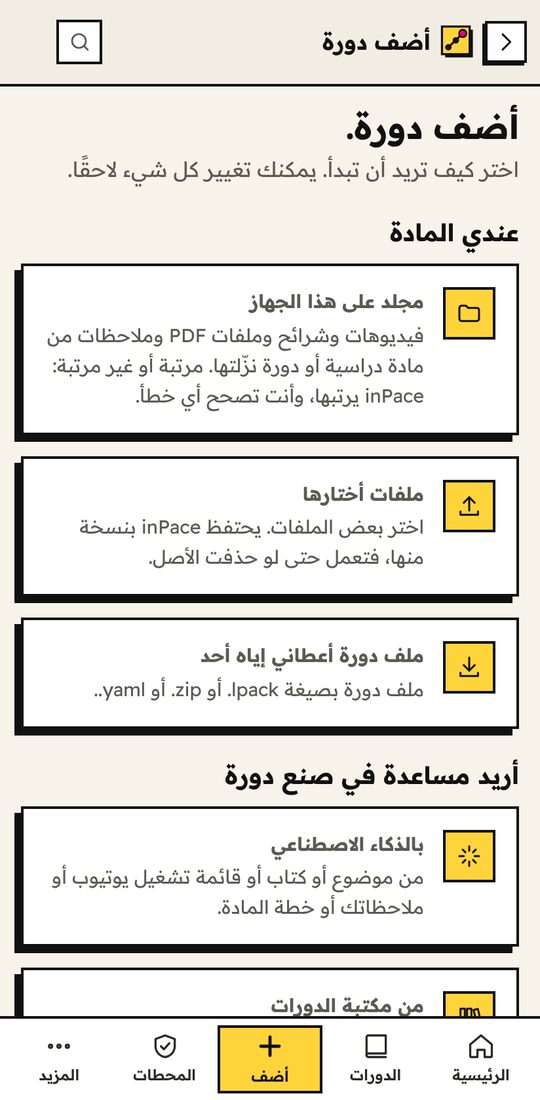
The Add a course page on a phone: a folder on this device, some files I pick, a course file, with AI, the library, or write it myself. صفحة «أضف دورة» على الهاتف.
16

Your dataبياناتك

  • Everything stays on your computer. Files only go to other people when you send them yourself.كل شيء يبقى على جهازك. ولا تصل الملفات لأحد إلا إذا أرسلتها بنفسك.
  • inPace only goes online for things you turn on: automatic updates, the AI course maker, YouTube titles, an online video you press play on, or videos you download for offline.لا يتصل inPace بالإنترنت إلا لما تفعّله: التحديثات التلقائية، أو صانع الدورات بالذكاء الاصطناعي، أو عناوين يوتيوب، أو فيديو على الإنترنت تضغط تشغيله، أو فيديوهات تحمّلها لمشاهدتها بدون إنترنت.
  • Back up everything into one password-protected file from Settings, and restore it on any computer. Backups leave out downloaded YouTube videos and files over 50 MB, so they stay small.انسخ احتياطيًا كل شيء في ملف واحد محمي بكلمة مرور من الإعدادات، واستعده على أي جهاز. لا تشمل النسخة الاحتياطية فيديوهات يوتيوب المحمّلة ولا الملفات الأكبر من 50 ميجابايت، لتبقى صغيرة.
  • Sharing a course never sends its videos. A shared course carries its lessons, tasks and small files (PDFs, slides, pictures under 25 MB). The other person gets the videos from YouTube, the course's download links, or their own folder.مشاركة دورة لا ترسل فيديوهاتها أبدًا. الدورة المشتركة تحمل دروسها ومهامها وملفاتها الصغيرة (PDF والعروض والصور الأصغر من 25 ميجابايت). ويحصل الشخص الآخر على الفيديوهات من يوتيوب أو روابط التحميل الخاصة بالدورة أو مجلده الخاص.
  • Video downloads use yt-dlp, a free open-source tool. inPace gets it from its official releases the first time you download, checks it, and keeps it up to date once a day (or only when you press Update now, in Settings → Video downloads). Download only videos you're allowed to keep.تحميل الفيديوهات يستخدم yt-dlp، وهو أداة مجانية مفتوحة المصدر. يجلبها inPace من إصداراتها الرسمية أول مرة تحمّل فيها، ويفحصها، ويحدّثها مرة في اليوم (أو فقط عندما تضغط حدّث الآن في الإعدادات ← تحميل الفيديوهات). حمّل فقط الفيديوهات المسموح لك بالاحتفاظ بها.

Curious what happens behind the scenes? Read how inPace works.تريد معرفة ما يحدث خلف الكواليس؟ اقرأ كيف يعمل inPace (بالإنجليزية).

Download inPaceحمّل inPace